ASML Holding
ASML
Microsoft
MSFT
NVIDIA
NVDA
4
Taiwan Semiconductor
TSM
5
Cisco
CSCO
If you already have an individual or entity account and now need to open an additional type of account (for example, adding a Company / Trust / SMSF account to an individual account or adding an individual account to an entity account), please follow the steps below:
1)Go to Account > Account Management > Add Account.
3)Confirm contact information.
4)Complete the account opening information.
5)Set login password.
6)Submit the application. (Your new moomoo ID will appear after you submit.)
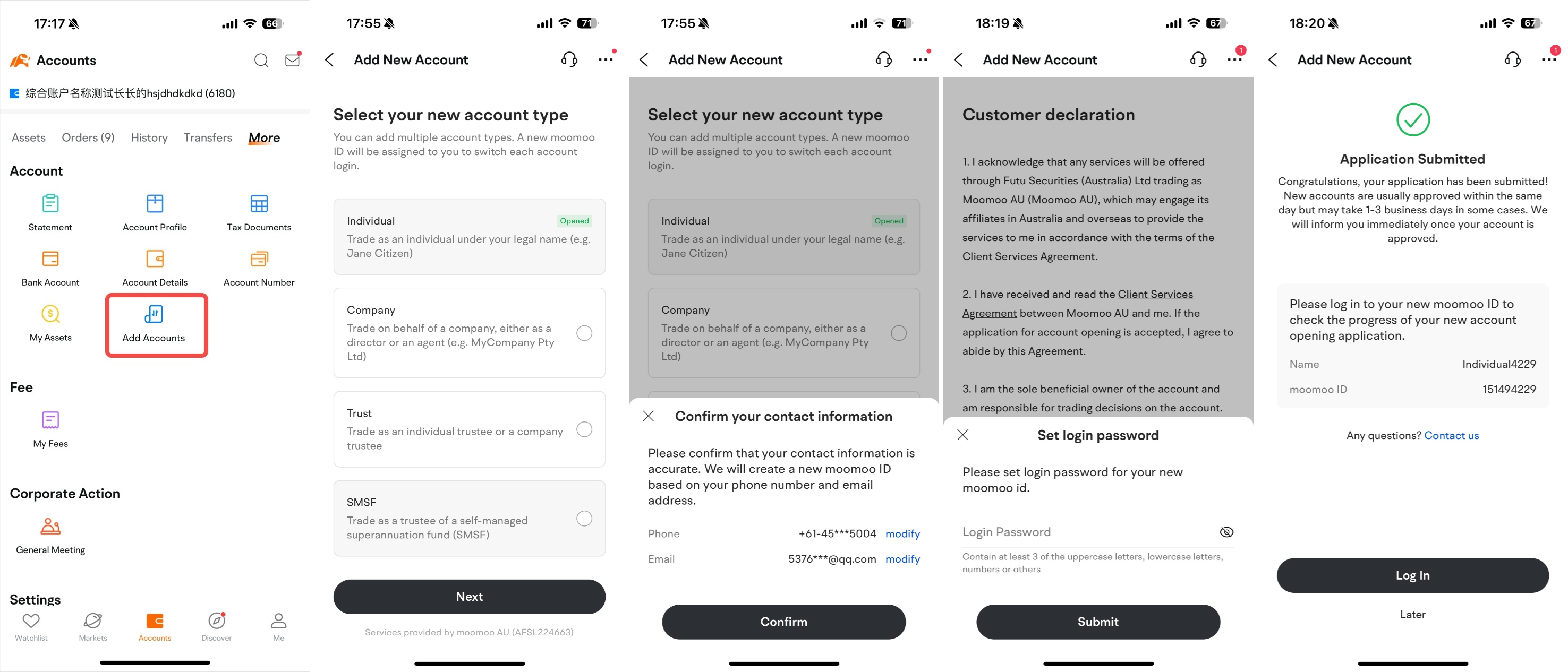
Or you can click on the link: https://openaccount.au.moomoo.com/addaccount to open a new account.
We recommend you update the app to version 14.18 for an improved experience.
Here are four login methods for new accounts:
• Method 1: moomoo ID + password;
• Method 2: mobile phone number + verification code;
• Method 3: email + password;
• Method 4: mobile phone number + password.
We recommend Method 2 for a smooth experience.