How to Open a Moomoo Account in Canada
Key Takeaway
Opening a moomoo account in Canada is simple and involves five streamlined steps, including app download, KYC form completion, identity verification, agreement signing, and submission.
Moomoo offers Canadian investors low cost trading, advanced tools like free US Level 2 data, and advanced order types, making it a cost-effective and powerful trading platform.
Eligibility requires being a Canadian resident aged 18+, with a valid SIN and government-issued photo ID for identity verification.
Funding your account is easy with methods like Interac e-Transfer, EFT, and wire transfer, enabling quick access to trading opportunities.
Why Choose Moomoo for Your Trading in Canada?
In a crowded field of online brokerages, moomoo has carved out a significant niche by offering a robust suite of tools that cater to both new and experienced traders. As you prepare to open a moomoo account, understanding its core advantages can solidify your decision. Moomoo's appeal in 2026 rests on several key pillars that combine cost-effectiveness with powerful functionality.
1. Canada’s First True "AI Broker"
As market volatility increases, the Moomoo AI Assistant has become an essential partner for Canadian traders. In 2026, you no longer have to spend hours reading through SEDAR+ filings. Moomoo’s AI provides:

AI Bot: Offers fast, data-driven responses to trading questions by drawing on real-time market data and credible news outlets such as WSJ and Bloomberg.
AI Stock Analysis: Provides instant stock evaluations by combining live market information, news updates, and technical indicators to support more efficient research.
AI Trend Analysis: Analyzes historical price behavior to estimate potential short-term market movements, giving investors additional context for market direction.
AI Announcement Summary: Converts lengthy company announcements and news updates into concise highlights, helping investors quickly grasp the key points.

This information is provided for informational purposes only and does not constitute investment advice or a recommendation to buy or sell any financial instrument. Content may be generated or assisted by artificial intelligence (AI) and may contain inaccuracies. Users should independently verify information before making any investment decisions.
2. Free US Level 2 Data
Gain deeper market insight with access to real-time Level 2 data, which shows you the order book for a stock, including the best bid and ask prices from different market participants. This helps you gauge market sentiment and liquidity.

3. Advanced Charting Tools
The platform boasts comprehensive charting capabilities with dozens of technical indicators and drawing tools, allowing for in-depth technical analysis directly within the app.
4. Safety and Regulation You Can Trust
In 2026, security is paramount. Moomoo Financial Canada Inc. is a member of the Canadian Investment Regulatory Organization (CIRO) and the Canadian Investor Protection Fund (CIPF). This means your eligible assets are protected up to $1 million per general account, providing the same level of security as a "Big Five" bank but with a modern, high-tech interface.
Before You Start: Moomoo Account Requirements for Canadians
To ensure your application process is as smooth and efficient as possible, it's wise to gather all the necessary information and documents beforehand. A little preparation can help you complete the entire procedure in minutes. This section outlines the eligibility criteria and the specific items you'll need to have on hand when you decide to open a moomoo account in Canada.
Eligibility and Required Information
Before diving into the application, you need to confirm you meet the basic eligibility criteria. Moomoo, like all regulated financial institutions, has specific requirements for its users. You will also need to provide standard personal information for identity verification and regulatory compliance.
Eligibility Checklist:
Age: You must be at least 18 years old.
Residency: You must be a resident of Canada with a valid Canadian residential address (P.O. boxes are not accepted).
Tax Identification: You must have a valid Social Insurance Number (SIN).
Once you've confirmed your eligibility, gather the following information. Having it ready will prevent you from having to pause your application to look things up.
Information Category | Details Required |
Personal Details | Full legal name, date of birth, and citizenship. |
Contact Information | A valid email address and a mobile phone number. |
Residential Address | Your current physical street address in Canada (must not be a P.O. Box). |
Tax Identification | Your 9-digit Social Insurance Number (SIN). |
Employment Status | Your current employment status (e.g., employed, self-employed, retired, student), your employer's name and address, and your occupation. This is a standard requirement by financial regulators like IIROC in Canada. |
Necessary Documents for Verification
The final piece of the puzzle is providing proof of your identity. This is a mandatory step known as Know Your Customer (KYC), which helps prevent fraud and money laundering. Moomoo uses a secure and quick electronic verification process. You will need one of the following valid, unexpired, government-issued photo IDs:
Driver's License
Provincial ID Card
Canadian Passport
Permanent Resident Card
Ensure the document is in good condition, and the photo, name, and expiration date are clearly legible. You will be asked to take a picture of the document during the application, so having the physical card ready is essential.
How to Open a Moomoo Account in Canada: A 5-Step Walkthrough
Now that you have all your information and documents ready, you're prepared to begin. The process of how to open a moomoo account is designed to be intuitive and fast. Follow these five steps carefully to get your account up and running.
Step 1: Download the App and Initiate Sign-Up
Your journey begins by getting the moomoo application onto your device.
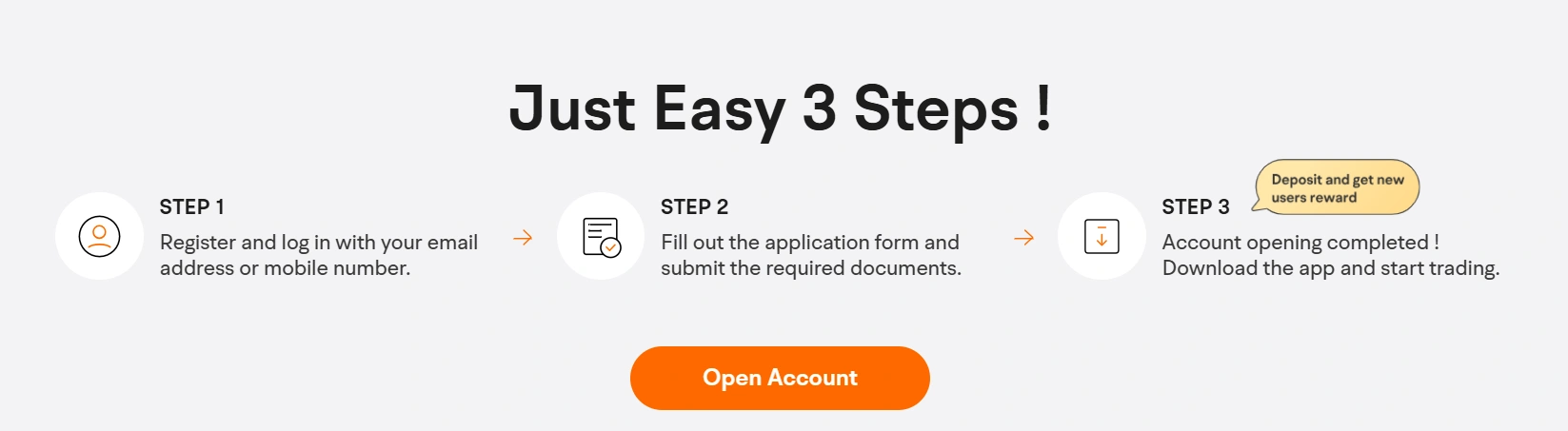
Download the App: Go to the Apple App Store (for iOS) or the Google Play Store (for Android) and search for "moomoo". Download and install the official app. Alternatively, you can visit the official moomoo website on your desktop computer to start the process.
Initiate Sign-Up: Open the app and tap the "Open Account" or "Sign Up" button. You will be prompted to create your login credentials.
Create Your Login: You can sign up using either your email address or your mobile phone number. Enter your chosen contact method, and moomoo will send you a verification code. Enter this code to confirm your contact information.
Set a Password: Create a strong, secure password for your account. It's recommended to use a combination of upper and lower-case letters, numbers, and symbols.
Step 2: Complete the Online Application Form
This is the most detailed part of the process, where you will provide the information you gathered earlier. The application is broken down into several sections. Take your time and ensure all information is entered accurately.
Personal Information: Enter your full legal name, date of birth, and citizenship exactly as they appear on your government ID.
Residential and Contact Details: Provide your permanent Canadian residential address and confirm your phone number and email.
Employment and Financial Profile: Fill in your employment status, employer details, and occupation. You will also be asked to provide estimates of your annual income, total net worth, and liquid net worth. These questions are standard regulatory requirements to understand your financial standing.
Investment Experience: You will be asked a series of questions about your investment experience, objectives (e.g., growth, speculation), and risk tolerance. Answer these questions honestly, as they help the brokerage ensure the products offered are suitable for you.
Account Type Selection: Canadian investors will need to specify whether they want to open a non-registered account, TFSA, or RRSP. Each account type has different tax implications, so choose according to your investment goals.
Step 3: Verify Your Identity Electronically
With the application form filled out, you may need to verify your identity. Moomoo's in-app verification is quick and secure.
Select ID Type: Choose the type of government-issued ID you will be using (e.g., Driver's License).
Capture ID Photos: The app will activate your phone's camera. You will be guided to take a clear, well-lit photo of the front of your ID, and then the back. Ensure there is no glare and that all four corners of the document are visible within the frame.
Step 4: Review Agreements and Submit Your Application
This is the final step before your application is sent for approval. It is crucial to review everything carefully.
Review Your Information: A summary page will display all the information you have entered. Double-check every detail for accuracy, especially your name, address, and SIN. A simple typo can cause delays in the approval process.
Read the Agreements: You will be presented with several legal documents, including the Canadian Investor Protection Fund (CIPF) disclosure and the Investment Industry Regulatory Organization of Canada (IIROC) relationship disclosure. While it can be tempting to scroll past, it's good practice to review these documents to understand the terms of service, responsibilities, and rules of the platform.
Electronically Sign: Once you are satisfied, you will electronically sign the documents by typing your name or checking a box. This is the digital equivalent of a physical signature.
Submit: Hit the final "Submit" button. Your application is now on its way to the moomoo review team.
Step 5: Await Moomoo Account Approval
You've done your part! Now, you just need to wait for moomoo to review and approve your application.
The approval timeline can vary. Thanks to the automated verification systems, many accounts are approved almost instantly or within a few hours. However, in some cases where manual review is required, it can take 1-3 business days.
You will be notified of your account status via email and a push notification from the moomoo app. Once you receive the "Welcome to moomoo!" notification, your account is officially open and ready for the next step: funding. This completes the core process of how to open a moomoo account.

Funding Your New Moomoo Account in Canada
An approved account is a fantastic milestone, but to start investing, you need to fund it. This section guides you through depositing money into your new moomoo account, the final step before you can begin trading. Moomoo offers several secure methods to transfer funds from your Canadian bank.
Moomoo Deposit Methods and Timelines for Canadian Investors
The primary methods for funding your moomoo account in Canada are Electronic Funds Transfer (EFT), Interac e-Transfer, and Wire Transfers. Understanding the differences between them can help you choose the best option for your needs.
Feature | Electronic Funds Transfer (EFT) | Interac e-Transfer | Wire Transfer |
Speed | 1-5 business days for funds to settle and be available for trading. Moomoo may grant instant buying power for a portion of the deposit. | Usually processed within 30 minutes to a few hours, making it one of the fastest options for Canadian investors. | Typically arrives within the same business day if initiated before the cutoff time. |
Fees | Free for both deposits and withdrawals on moomoo's end. Your bank may charge fees, but this is rare for EFT. | Most Canadian banks include a certain number of free e-Transfers per month with standard accounts. Additional transfers typically cost $1-$1.50. | Moomoo does not charge for incoming wires, but your Canadian bank will almost always charge an outgoing wire fee (typically $25-$50). |
Deposit Limits | Lower limits compared to wires. For example, a daily limit might be $50,000, but this can vary. | Usually limited to $3,000 per transaction, with daily and weekly maximums set by your bank. | Much higher limits, making it suitable for large deposits. |
Best For | Regular, smaller deposits and investors who are not in a hurry to trade with the full amount immediately. | Quick transfers of moderate amounts that need to be available for trading quickly. | Large, urgent deposits where speed is the top priority and the bank fee is acceptable. |
For most new Canadian investors, the Interac e-Transfer is the recommended method due to its speed, convenience, and widespread use in the Canadian banking system.
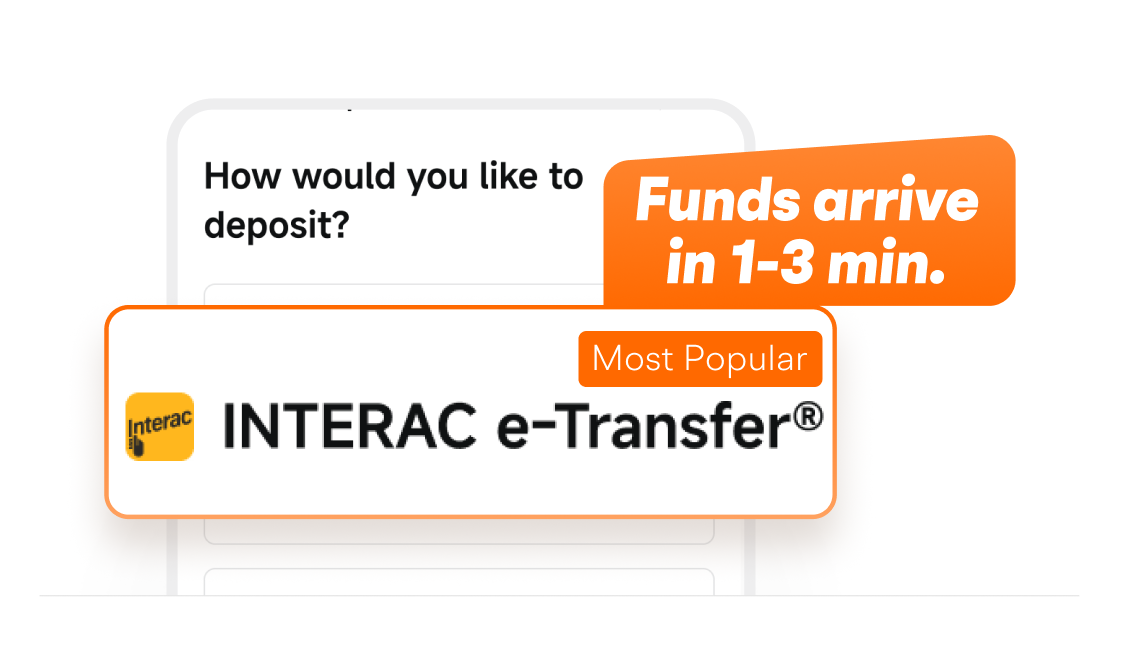
A Quick Guide to Making Your First Deposit
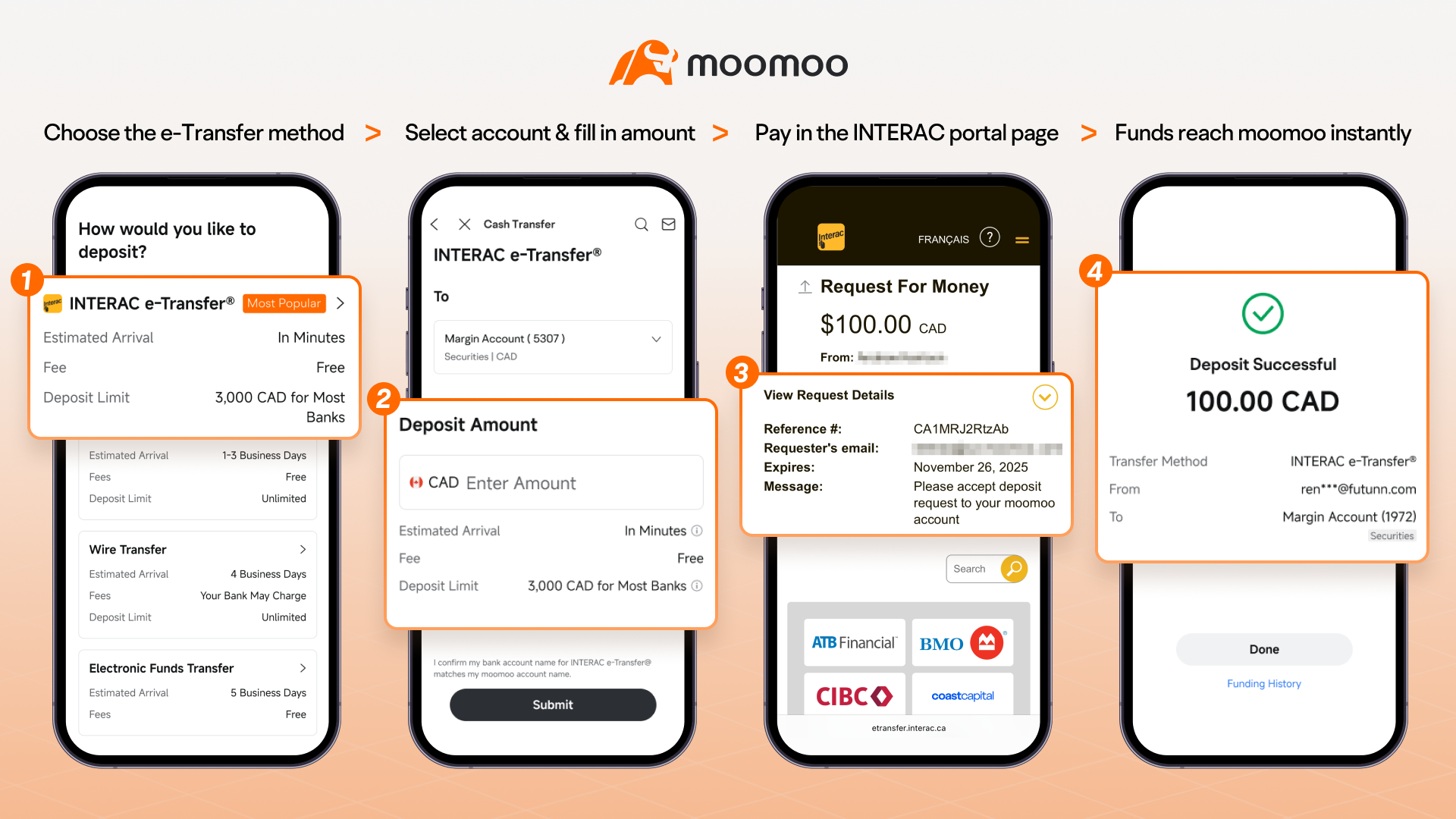
Initiating your first deposit via Interac e-Transfer is a straightforward process within the moomoo app.
Navigate to the Deposit Section: Open the moomoo app, log in, and tap on the "Me" or "Account" tab in the bottom right corner. From there, select the "Deposit" button.
Choose Transfer Method: Select "Interac e-Transfer" as your deposit method.
Follow the Instructions: You will be provided with the email address and any necessary reference information to complete the e-Transfer from your Canadian bank's mobile app or online banking portal.
Complete the Transfer: Log into your Canadian bank's platform, select the Interac e-Transfer option, enter the moomoo recipient details, and specify the amount you wish to deposit.
Confirmation: Once the transfer is complete, you'll receive a confirmation in both your banking app and the moomoo app that the funds have been received.
For those who prefer EFT:
Navigate to the Deposit Section: Open the moomoo app, log in, and tap on the "Me" or "Account" tab in the bottom right corner. From there, select the "Deposit" button.
Choose Transfer Method: Select "Bank Transfer (EFT)" as your deposit method.
Link Your Bank Account: You will be prompted to link your external Canadian bank account. Moomoo uses a secure third-party service to connect to your bank. Select your bank from the list and enter your online banking login credentials.
Enter Deposit Amount: Once your bank account is successfully linked, enter the amount of money you wish to deposit into your moomoo account.
Review and Confirm: Double-check the deposit amount and the bank account you are transferring from. Tap "Confirm" to initiate the transfer.
You will receive a confirmation that the deposit has been initiated. While the funds may take a few days to fully settle, moomoo often provides "instant buying power," allowing you to start trading with a portion of your deposit almost immediately.
What to Do After Your Moomoo Account is Open
Congratulations! Your account is open and funded. Now the exciting part begins. To help you get started, here are the immediate next steps to take to familiarize yourself with the platform and begin your investment journey.
Claiming Your New User Welcome Bonus

One of the most exciting parts of opening a new brokerage account is the welcome promotion. Moomoo is famous for its generous new user bonuses, which often include free stocks or cash rewards.
To claim your bonus, navigate to the "Me"> "Rewards" section of the app. Here, you will see the promotions you are eligible for. Typically, these bonuses are tied to your initial deposit.
This presentation is for informational and educational use only and is not a recommendation or endorsement of any particular investment or investment strategy. Investment information provided in this content is general in nature, strictly for illustrative purposes, and may not be appropriate for all investors. Read more