How to Buy Stocks on Moomoo [2026 Guide]
For Canadian investors, navigating the stock market in 2026 requires a platform that balances professional-grade data with cost-efficiency. Whether you are looking to hedge against inflation or capitalize on the latest tech rally, learning how to buy stocks on moomoo is the first step toward a more sophisticated trading experience.
Moomoo has quickly become a favorite in Canada for its powerful research tools and competitive pricing. By the end of this article, you’ll know exactly how to buy stocks on moomoo while taking full advantage of localized features like the 0% currency exchange rate for US-listed assets.

Is moomoo Free to Use?
While the moomoo app itself is free to download and open an account, trading on moomoo Canada is not completely commission-free. Instead, the platform uses a low-cost, per-share fee structure for buying and selling stocks and ETFs.
For Canadian stocks and ETFs, investors typically pay about CA$0.0149 per share with a minimum of CA$1.49 per trade. For U.S. stocks and ETFs, the cost is around US$0.0099 per share with a minimum of US$1.99 per order. These fees include a combination of commission and platform charges that support the trading infrastructure and technology behind the app.
The good news for Canadian investors is that many basic services are free, including account opening, account maintenance, deposits via bank transfer, and electronic statements. There are also no inactivity fees, which makes moomoo attractive for long-term investors who don’t trade frequently.
>> If you want to know more information about moomoo Canada fees, you can read this guide: Moomoo Canada Fees 2026: Is It the Best Low-Cost Broker?

How to Buy Stocks on moomoo: Step-by-Step Guide
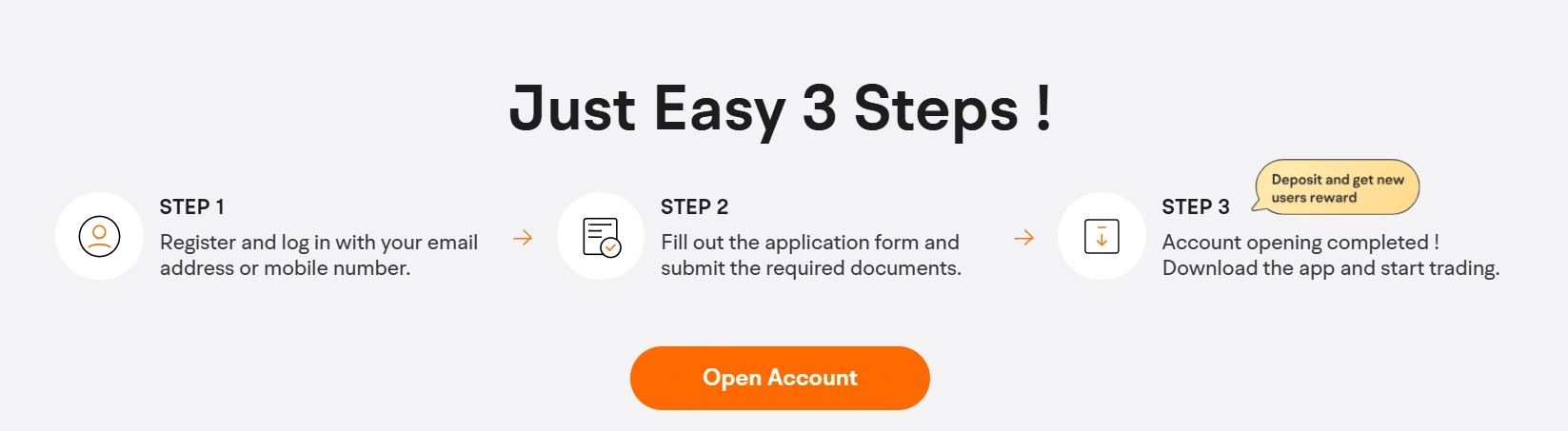
Step 1: Open and Verify Your Account
Download the moomoo app and click "Open Account." For Canadian residents, you'll need a valid Social Insurance Number (SIN) and a piece of government-issued ID. The process is fully digital and typically takes just a few minutes to complete. During this stage, you can choose to open a non-registered Cash account or a tax-advantaged account like a TFSA or RRSP.
Step 2: Fund Your Account
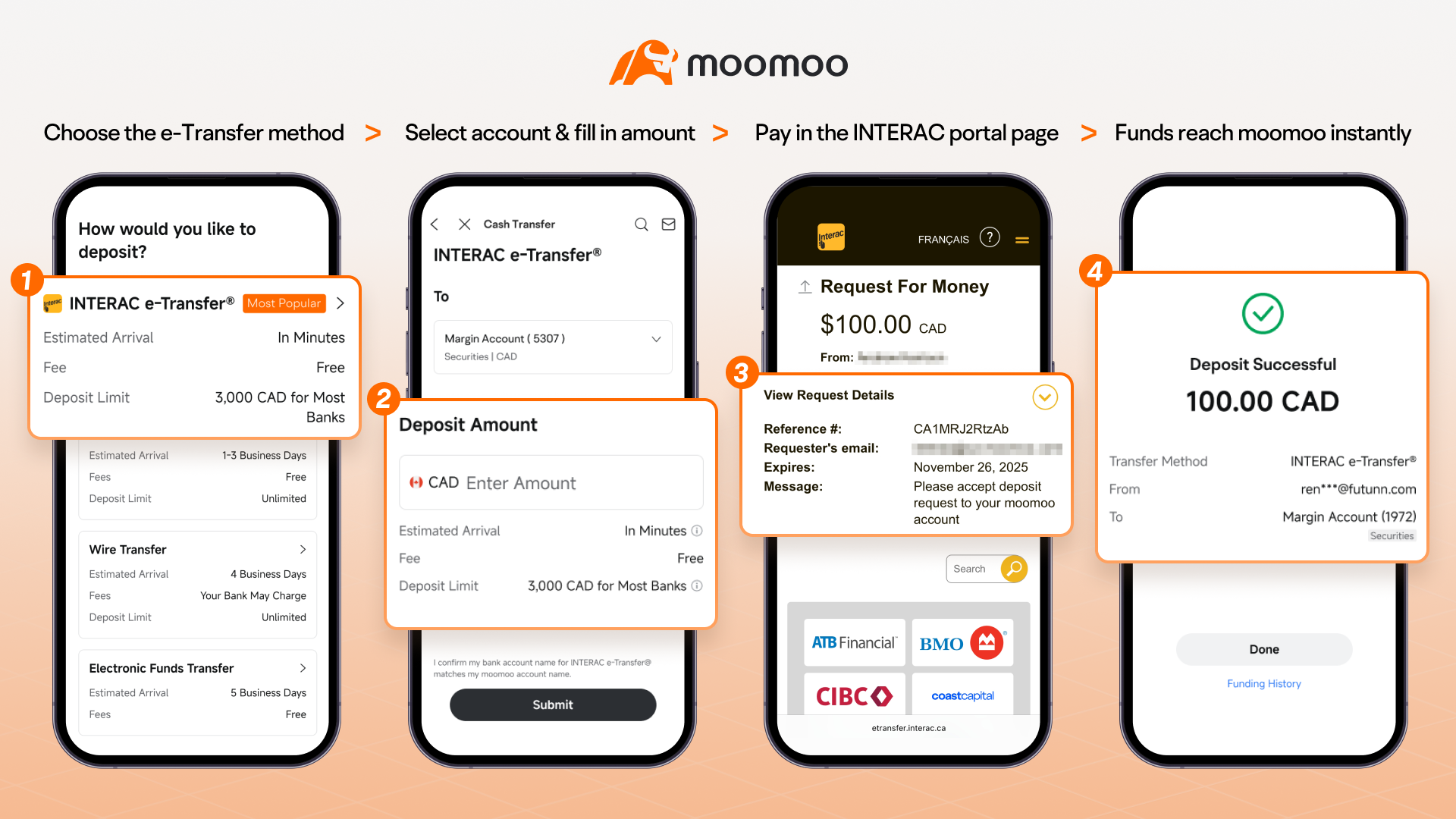
Once verified, navigate to the "Accounts" tab and select "Deposit." You can link your Canadian bank account via Instant Deposit or EFT.
In a volatile market, a few minutes can be the difference between a successful hedge and a missed opportunity. Don't let slow bank transfers stand between you and your next trade. With moomoo’s Real-time Deposit (via INTERAC e-Transfer®), your funds can arrive in just 1-3 minutes, ensuring you have the buying power exactly when the market moves.
If you plan to buy US-listed stocks, use the in-app currency exchange tool. Moomoo offers a 0% currency exchange rate, allowing you to swap CAD for USD at the interbank rate without the heavy markups charged by traditional banks.

Step 3: Research Stocks with moomoo Advanced Tools
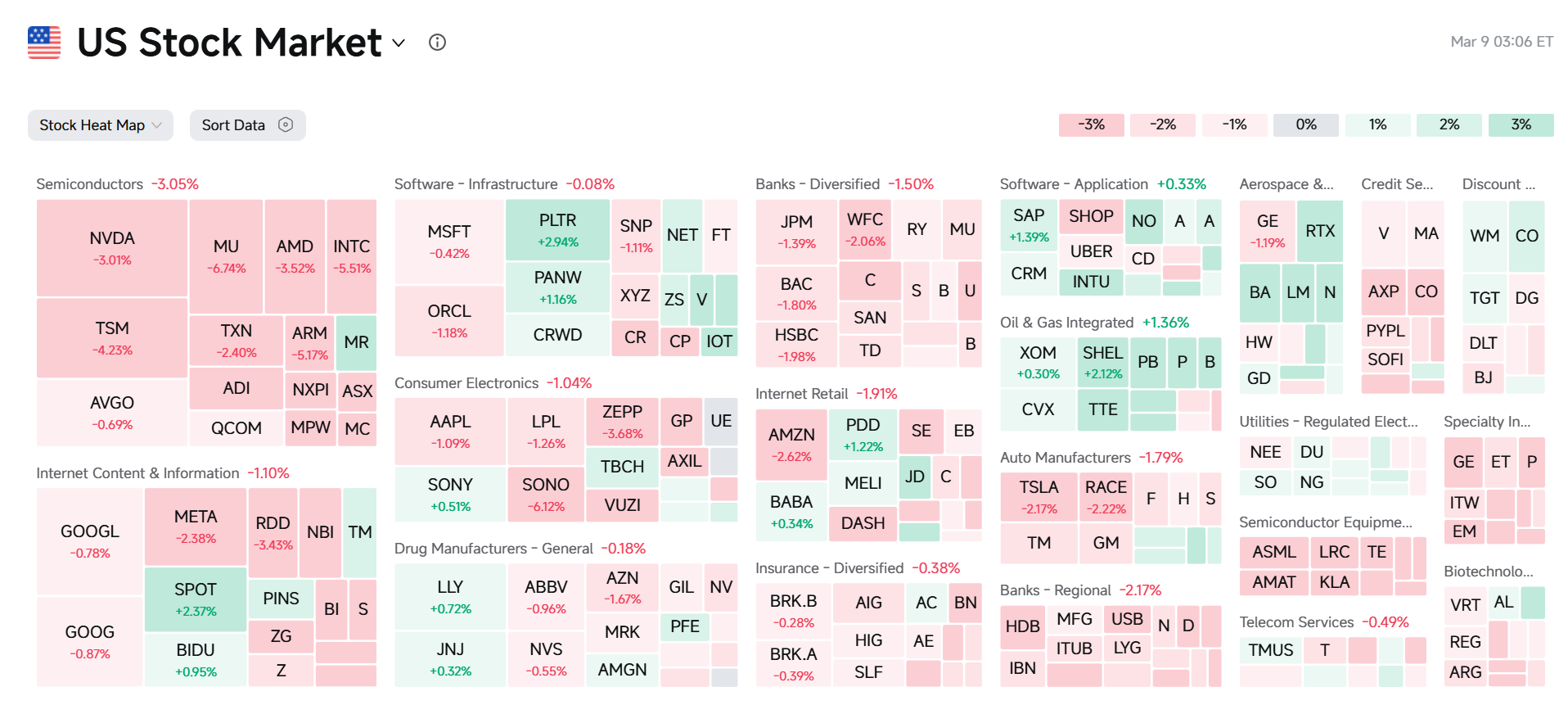
1. Visualize the Market with Heat Maps and Industry Chains
Don’t just look at a list of tickers; see the big picture.
Heat Maps: Quickly identify which sectors are leading the 2026 market rally. You can sort by Market Cap or Volume to see where the "smart money" is moving in real-time.
Industry Chain Maps: If you are interested in a hot theme like Artificial Intelligence or Electric Vehicles, moomoo maps out the entire ecosystem. You can follow the chain from upstream raw materials (like lithium) to downstream charging infrastructure, helping you find "hidden gem" stocks before they go mainstream.
2. Leverage the Moomoo AI Assistant (Your 24/7 Analyst)
When researching stocks—whether looking up “gold stock analysis,” asking “is now a good time to buy Tesla stock?,” or tracking the latest company updates—investors often face an overwhelming amount of financial data, news, and earnings reports.
In rapidly changing markets, where even a single piece of news can impact prices within minutes, processing all this information manually can slow down decision-making. Moomoo AI serves as a 24/7 intelligent investment assistant, helping you quickly evaluate individual stocks by answering market questions, summarizing company announcements, and highlighting key insights from financial reports.

Instead of combing through lengthy filings or multiple news sources, investors receive concise, AI-generated summaries and actionable market insights in seconds, making it easier to understand a company’s fundamentals and recent developments, and make faster, more informed investment decisions.

3. Go Deep with Free Level 2 Market Data
While most Canadian banks charge a premium for market depth, moomoo provides free real-time Level 2 data (up to 60 levels of bids and asks).
Why it matters: Level 1 only shows the current price. Level 2 shows you the pending orders. By seeing the "order book," you can spot significant support and resistance levels, allowing you to place your orders with much higher precision.

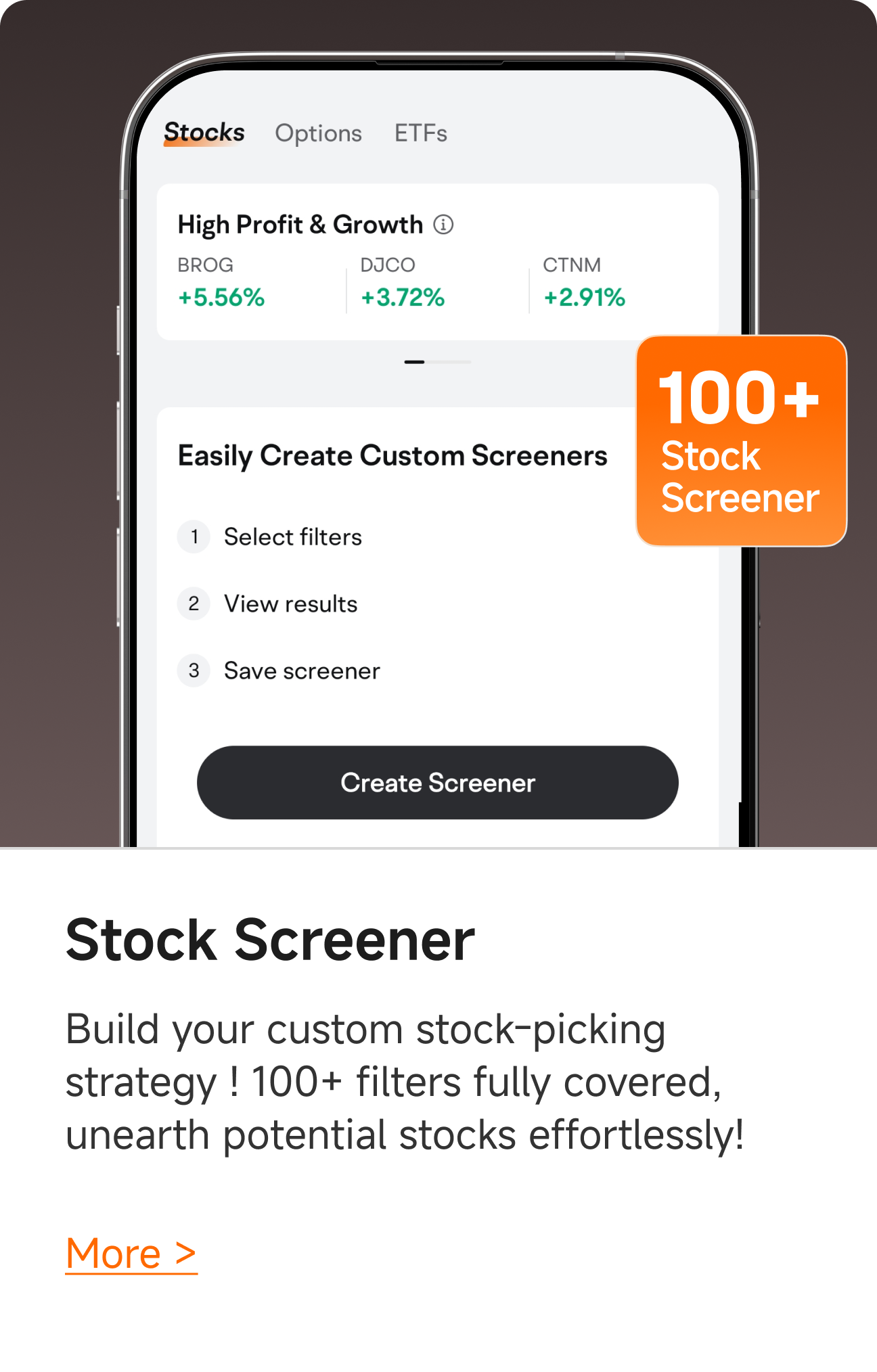
4. Filter Your Way to Success with the Stock Screener
Stop searching and start filtering. Use the Stock Screener to narrow down thousands of stocks in seconds:
Fundamental Filters: Find undervalued companies using P/E, P/S, or Debt-to-Equity ratios.
Technical Filters: Identify breakout opportunities using RSI, MACD, or the "Bullish Flag" pattern recognition tool.
Institutional Tracker: See what the "whales" (like Warren Buffett or major hedge funds) are buying and selling to align your portfolio with institutional trends.
Step 4: Execute Your Trade
Search for the ticker symbol of the company you want to buy (e.g., AAPL, NVDA, or a gold miner like AEM).
Tap Trade on the stock's detailed quotes page.
Choose your Order Type.
While most Canadian brokers offer basic "Buy/Sell," moomoo allows you to use Conditional Orders to manage risk automatically:
Limit Order: Ensures you only buy at your specified price or better. This is essential for volatile stocks where the "market price" can jump unexpectedly.
Stop-Loss Order: Protects your downside. You can set a "Trigger Price"; if the stock hits that level, moomoo automatically submits an order to sell, preventing a small dip from becoming a major loss.
Take-Profit Order: Don't let your gains evaporate. Set a target price where you’d like to exit, and the system will lock in your profits while you sleep.
Trailing Stop: This is the ultimate "Trend Follower." It follows the stock price up by a certain percentage or dollar amount. If the stock reverses and hits your trailing buffer, it sells—allowing you to capture the maximum upside of a rally while protecting your exit.
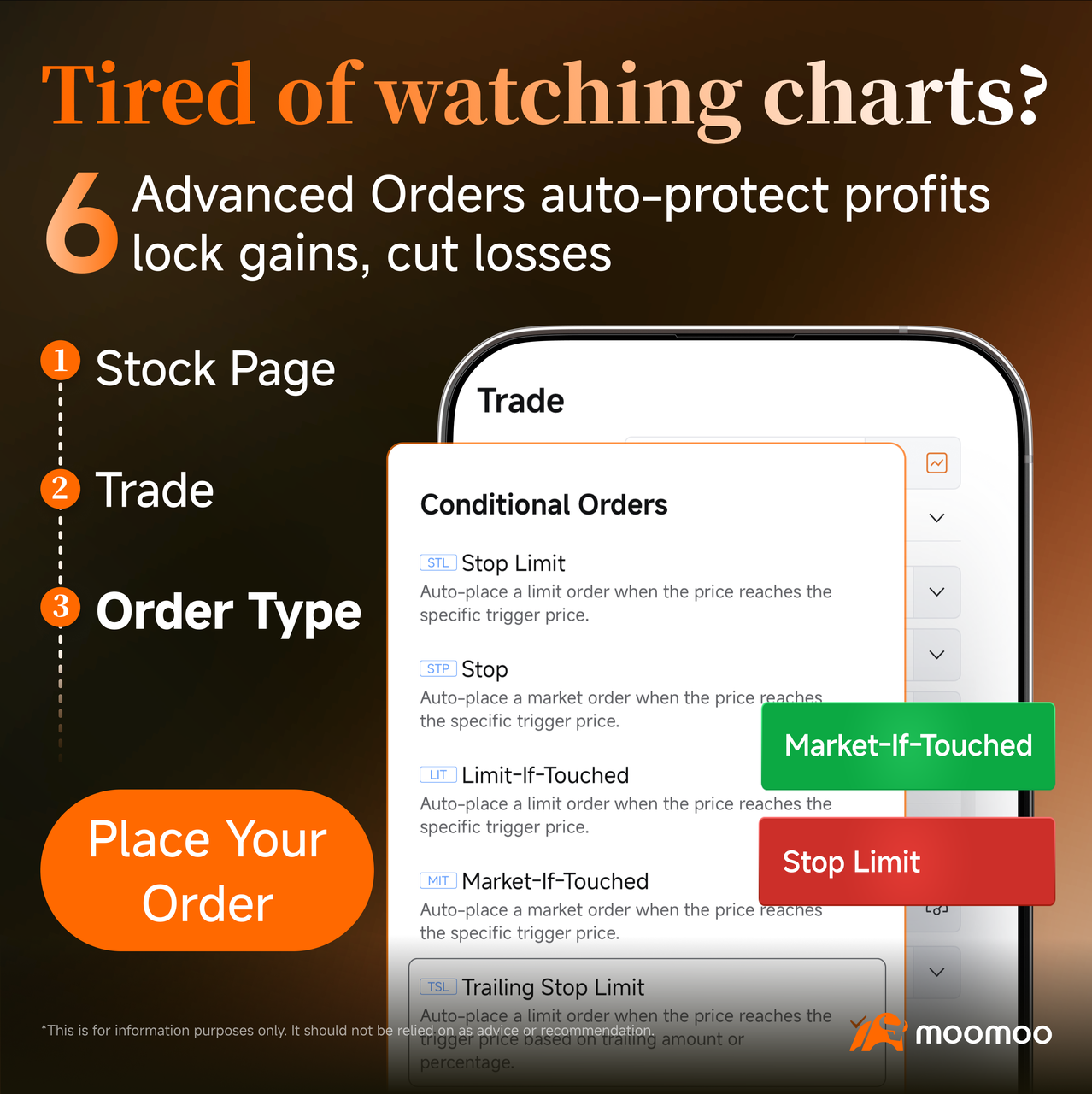
3. Enter the quantity and confirm the trade.
Step 5: Monitor and Manage
After your order is filled, your new position will appear in your "Assets" tab. You can set real-time price alerts or use the AI Weekly Brief to stay updated on company news. This proactive approach helps you decide when to hold, buy more, or take profits.
You may also like: Moomoo Canada Review 2026: Is This the Best Trading App for Canadians?
How to Use moomoo Stock Cash Coupon to Save Money
What is a moomoo Stock Cash Coupon?
A cash coupon is a digital reward that can be applied to your stock purchases. Once you execute a qualifying trade, the value of the coupon is credited back to your account balance. Think of it as a "cash-back" reward for your investing activities.
Step-by-Step: How to Use Your Coupon
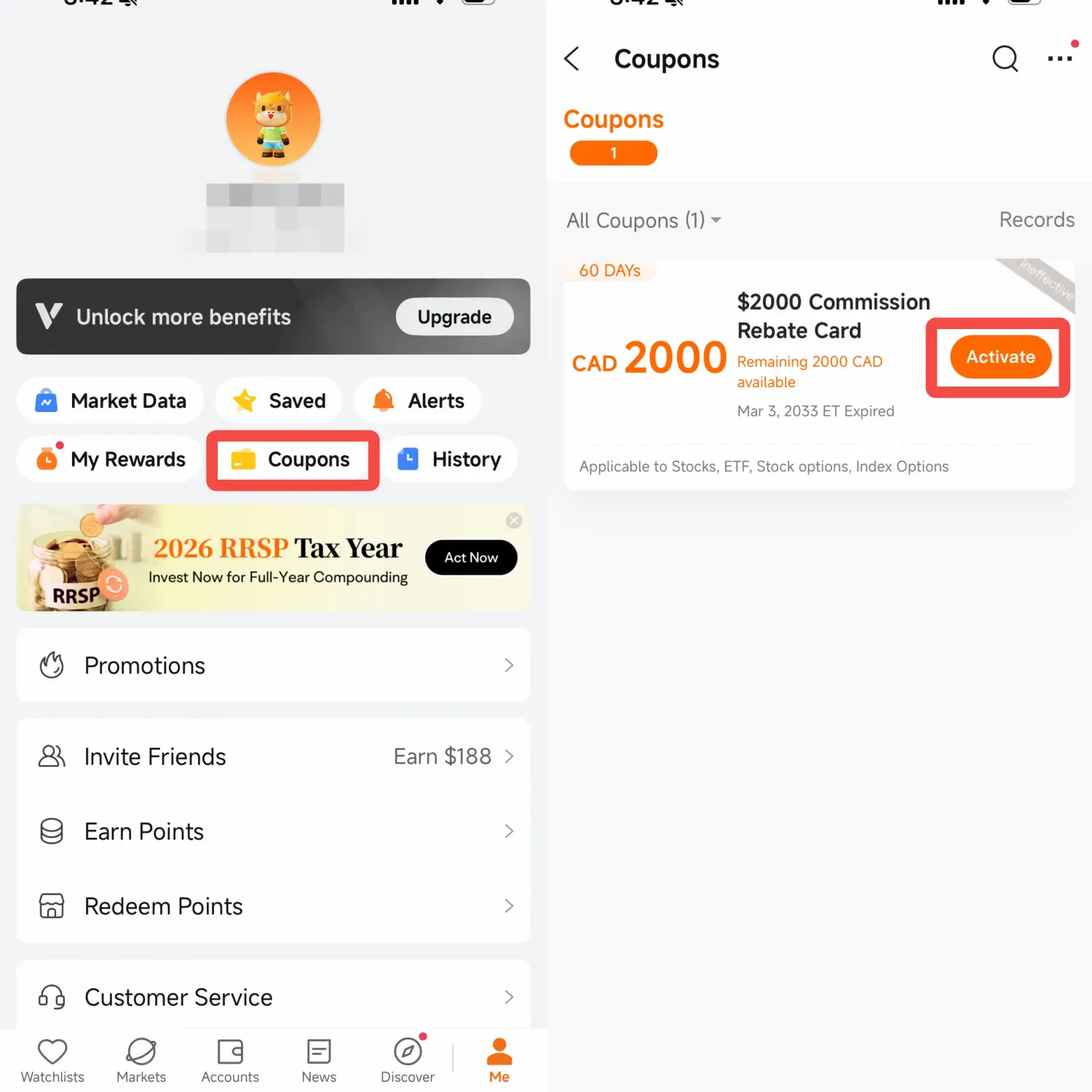
Claim Your Rewards: Navigate to the "Me" tab in the moomoo app and tap on "Coupons." Here you will find any welcome bonuses, referral rewards, or promotional coupons you’ve earned.
Activate the Coupon: Select the moomoo stock cash coupon you wish to use and check the "Conditions of Use." Some coupons may require a minimum trade amount (e.g., "Use on any trade over $100").
Execute a Qualifying Trade: Search for the moomoo stock you wish to buy. As long as the trade meets the coupon's requirements, the coupon will be automatically "linked" to the transaction.
Receive Your Cashback: After the trade is successfully filled, the coupon status will change to "Used," and the cash value will be deposited into your account, typically within a few business days.
>> Learn more: Moomoo Canada Promotion 2026: Unlock Your Welcome Bonuses & Rewards
AI disclaimer: This information is provided for informational purposes only and does not constitute investment advice or a recommendation to buy or sell any financial instrument. It has not been prepared with regard to the investment objectives, financial situation, or needs of any particular individual.
Content may be generated or assisted by artificial intelligence (AI) and may contain inaccuracies. Users should independently verify information before making any investment decisions.
This presentation is for informational and educational use only and is not a recommendation or endorsement of any particular investment or investment strategy. Investment information provided in this content is general in nature, strictly for illustrative purposes, and may not be appropriate for all investors. Read more