Best Trading Platform in Canada for Beginners: Top Picks for 2026

What Makes the Best Trading Platform for Beginners?
Choosing the best trading platform for beginners isn't just about finding the lowest fees or the most popular app. As a new investor in Canada, you need a platform that makes it easy to learn, simple to navigate, and safe to grow your money over time.
The best online trading platforms for beginners strike a balance between simplicity and functionality. They don't overwhelm you with complex charting tools on day one, but they give you room to expand your skills as your confidence grows.
Whether you're looking to invest in Canadian stocks, ETFs, or even explore US markets, the right platform should feel like a supportive environment — not a confusing trading floor.
Let's break down what to look for and what pitfalls to avoid.
Key Features Beginners Should Look For
Not all trading apps for beginners are created equal. Here are the essential features that separate the best online trading platforms for beginners from the rest:
1. Intuitive User Interface
If you can't figure out how to buy your first stock within five minutes, the platform is too complex. The best trading platform for beginners in Canada should have a clean, well-organized layout with clear navigation. Look for platforms that guide you through the process step by step.
2. Low or Zero Commission Fees
High trading fees can eat into your returns quickly, especially when you're starting with a small account. Many of the best online trading platforms for beginners in Canada now offer commission-free stock and ETF trades, making it affordable to start investing with any budget.
3. Educational Resources and Learning Tools
Top trading apps for beginners provide built-in educational content — think video tutorials, articles, webinars, and even in-app explanations of terms and concepts. The best platforms teach you while you trade, so you're constantly building knowledge.
4. Paper Trading or Demo Accounts
Practice makes perfect. A paper trading feature lets you simulate real trades with virtual money, so you can test strategies and get comfortable with the platform without risking a single dollar. This is a must-have for anyone new to investing.
5. Registered Account Options (TFSA, RRSP, FHSA)
As a Canadian investor, you want to maximize your tax advantages from the start. The best trading platform for beginners in Canada should offer Tax-Free Savings Accounts (TFSA), Registered Retirement Savings Plans (RRSP), and ideally the First Home Savings Account (FHSA).
6. Canadian Regulatory Protection
Safety matters. Make sure any platform you choose is regulated by the Canadian Investment Regulatory Organization (CIRO) and offers Canadian Investor Protection Fund (CIPF) coverage. This protects your investments if the brokerage ever faces financial trouble.
7. Responsive Customer Support
When you're new to trading, questions will come up. The best online trading platforms for beginners offer responsive customer support through live chat, phone, or email — so you're never stuck without help.
8. Mobile-Friendly Experience
Most beginners prefer managing their investments on the go. Leading trading apps for beginners offer full-featured mobile experiences with real-time quotes, easy order placement, and instant notifications — all from your phone.
Common Mistakes Beginners Make When Choosing a Trading Platform
Even with the best intentions, many new Canadian investors fall into these traps when selecting their first platform:
1. Choosing Based on Hype Alone
Just because a platform is trending on social media doesn't mean it's the best trading platform for beginners. Some popular apps are designed for experienced day traders and can overwhelm newcomers with advanced features they don't need yet.
2. Ignoring Hidden Fees
A platform might advertise "free trades" but charge fees elsewhere — currency conversion fees, withdrawal fees, inactivity fees, or data subscription costs. Always read the full fee schedule before committing to any online trading platform.
3. Overlooking Currency Conversion Costs
This is a big one for Canadian investors. If you plan to buy US stocks, some platforms charge 1.5% or more on every currency conversion. Over time, this adds up significantly. Look for platforms that offer USD accounts or favourable exchange features.
4. Skipping the Learning Phase
Some beginners rush to fund their account and start buying stocks immediately without understanding basic concepts like order types, market hours, or diversification. The best trading apps for beginners encourage learning first — take advantage of those resources.
5. Not Considering Long-Term Needs
Your first platform doesn't have to be your last, but it's smart to think ahead. Will you want options trading later? Access to international markets? Advanced charting tools? Choosing the best online trading platform for beginners that also scales with your growth saves you the hassle of switching later.
6. Forgetting About Account Types
Opening a taxable cash account when you have unused TFSA or RRSP room is a costly mistake. The best trading platform for beginners in Canada makes it easy to open registered accounts and clearly explains the tax benefits of each.
Best Online Trading Platforms for Beginners in Canada (2026)
We've tested and compared the top trading apps for beginners available to Canadian investors in 2026. Below is a comprehensive overview to help you find the best online trading platform for beginners based on your priorities — whether that's low fees, simplicity, advanced tools, or big-bank security.
Feature | Moomoo | Wealthsimple | Questrade | Interactive Brokers | TD Easy Trade |
Best For | Advanced tools at low cost | Simple, commission-free trading | Budget-conscious beginners | Growing into advanced trading | Big bank security |
Stock Commission | CA$0.0149/share (min $1.49) | $0 | $0 for ETFs; $4.95–$9.95 for stocks | $0 (IBKR Lite) | $0 (up to 50 trades/year) |
US Stock Commission | US$0.0099/share (min $1.99) | $0 | $4.95–$9.95 | $0 (IBKR Lite) | $0 (up to 50 trades/year) |
Options Trading | $0.65/contract (min $1.00 USD) | Supported | $6.95 + $0.75/contract | $0.65/contract | Not supported |
Currency Conversion Fee | $0 | 1.5% (or $10/month for Plus) | 2% (or Norbert's Gambit) | Low FX markup (~0.2%) | ~1.5% |
Markets | US & Canadian | US & Canadian | US & Canadian | Global (150+ markets) | US & Canadian |
Asset Types | Stocks, ETFs, Options | Stocks, ETFs, Options, Crypto | Stocks, ETFs, Options, Bonds, GICs | Stocks, ETFs, Options, Futures, Bonds, Forex | Stocks, ETFs |
Registered Accounts | TFSA, RRSP, Cash, Margin | TFSA, RRSP, FHSA, RESP | TFSA, RRSP, FHSA, RESP, LIRA | TFSA, RRSP, RESP | TFSA, RRSP, FHSA |
Paper Trading | Yes | No | Yes | Yes | No |
Level 2 Data | Free | Not available | Paid add-on | Paid add-on | Not available |
Regulation | CIRO + CIPF | CIRO + CIPF | CIRO + CIPF | CIRO + CIPF | CIRO + CIPF |
Investor Protection | Up to $1,000,000 CAD | Up to $1,000,000 CAD | Up to $1,000,000 CAD | Up to $1,000,000 CAD | Up to $1,000,000 CAD |
Minimum Deposit | $0 | $0 | $1,000 | $0 | $1 |
Moomoo – Best Trading App for Beginners Who Want Advanced Tools
Moomoo has quickly become one of the most talked-about trading apps for beginners in Canada since its launch in 2023. Operated by Moomoo Financial Canada Inc. — a subsidiary of Nasdaq-listed Futu Holdings (FUTU) — it brings institutional-grade tools to everyday retail investors without the institutional price tag.
What makes moomoo stand out as the best trading platform for beginners who want more than just basic buy/sell buttons is its powerful combination of free Level 2 market data, AI-powered research tools, and a professional desktop platform — all available at some of the lowest trading fees in Canada. The platform offers up to 60 levels of bid/ask depth through Nasdaq TotalView and NYSE ArcaBook, which most Canadian banks charge $20–$80/month to access.
For beginners, moomoo's paper trading feature is a game-changer. You can practice with virtual money in a realistic market environment before committing real funds. The platform also includes AI-driven stock analysis, trend predictions, and announcement summaries that help new investors make informed decisions without spending hours on research.
Pros:
Free Level 2 market data (up to 60 levels of depth) — a premium feature most banks charge for
$0 currency conversion fee for CAD/USD — a major cost saving for trading US stocks
Paper trading available for risk-free practice
AI-powered tools (stock analysis, trend prediction, market assistant)
Low commissions: CA$0.0149/share for Canadian stocks, US$0.0099/share for US stocks
$0 account fees for RRSP and TFSA
Professional-grade desktop platform with multi-monitor support
Regulated by CIRO with CIPF protection up to $1,000,000 CAD

Cons:
Limited account types (no FHSA, RESP, or joint accounts currently)
No mutual funds or bonds — focused on stocks, ETFs, and options only
Interface may have a slight learning curve for complete beginners due to the richness of available tools
Newer to Canada compared to established banks (launched 2023)

Wealthsimple – Best for Simple, Commission-Free Trading
Wealthsimple is often the first name that comes up when Canadians search for the best trading platform for beginners — and for good reason. Founded in 2014 in Toronto, it pioneered commission-free trading in Canada and has built a reputation for making investing as simple and approachable as possible.
The platform's clean, minimalist interface is designed specifically for people who have never invested before. There are no confusing charts, no overwhelming data feeds — just a straightforward way to buy stocks, ETFs, options, and even cryptocurrency. Wealthsimple also offers the widest range of registered accounts among beginner-friendly platforms, including TFSA, RRSP, FHSA, and RESP.
Wealthsimple is ideal for beginners who value simplicity over advanced features and want a single app to manage their entire financial life — from investing to saving to tax filing.
Pros:
$0 commission on all stock and ETF trades
Extremely simple, beginner-friendly interface
Widest range of account types (TFSA, RRSP, FHSA, RESP, joint accounts)
Supports cryptocurrency trading
Fractional shares available — invest with as little as $1
All-in-one financial platform (investing, crypto, tax filing, cash account)
No minimum deposit required
Strong brand trust and large Canadian user base
Cons:
1.5% currency conversion fee on US stock trades (unless subscribed to Plus at $10/month)
No Level 2 market data available
Limited charting and technical analysis tools
No paper trading or demo account
Fewer advanced order types compared to other platforms
No desktop trading platform — mobile and web only
Questrade – Best Online Trading Platform for Beginners on a Budget
Questrade has been a staple in Canadian online investing for over 25 years, earning its reputation as the best online trading platform for beginners who want low fees and a wide variety of investment products. It was one of the first Canadian brokerages to offer commission-free ETF purchases, which remains one of its strongest selling points for new investors building diversified portfolios.
What sets Questrade apart is its balance of affordability and product breadth. Unlike simpler platforms that only offer stocks and ETFs, Questrade gives beginners access to options, bonds, GICs, mutual funds, and international markets — all under one roof. This makes it an excellent choice if you want a platform that can grow with you over time.
Questrade also offers multiple trading platforms — from its straightforward Questrade Trading to the more advanced Questrade Edge — so beginners can start simple and upgrade their experience as they gain confidence.
Pros:
$0 commission on ETF purchases — perfect for passive investors
Wide range of investment products (stocks, ETFs, options, bonds, GICs, mutual funds)
Comprehensive account types (TFSA, RRSP, FHSA, RESP, LIRA, corporate)
Multiple platform options for different experience levels
Over 25 years of trusted service in Canada
Regulated by CIRO with CIPF protection
Cons:
$1,000 minimum deposit to open an account
Stock trading commissions range from $4.95–$9.95 per trade
Currency conversion fee of approximately 2% (Norbert's Gambit workaround available but complex for beginners)
Interface feels dated compared to newer fintech apps
Level 2 data requires a paid subscription
Customer support can be slow during peak times
Interactive Brokers – Best for Beginners Ready to Level Up
Interactive Brokers (IBKR) is a global powerhouse in online trading, and its Canadian offering is no exception. While it's traditionally known as a platform for professionals, the introduction of IBKR Lite — with commission-free US stock and ETF trades — has made it increasingly accessible as a trading platform for beginners who plan to grow quickly.
IBKR stands out for its unmatched market access. From a single account, you can trade on 150+ markets in 34 countries, accessing stocks, ETFs, options, futures, bonds, and forex. For beginners who know they'll eventually want global diversification or advanced strategies, starting with Interactive Brokers eliminates the need to switch platforms later.
The platform's Trader Workstation (TWS) is undeniably powerful but comes with a steeper learning curve. However, IBKR's newer mobile app and web portal (Client Portal) offer a much more beginner-friendly experience.
Pros:
$0 commission on US stocks and ETFs with IBKR Lite
Access to 150+ global markets from one account
Extremely competitive margin rates (starting ~4.58% APR)
Low currency conversion fees (~0.2% markup)
Paper trading account available for practice
Widest range of tradeable assets (stocks, ETFs, options, futures, bonds, forex)
Powerful research tools and educational content (IBKR Campus)
Competitive interest earned on idle cash
Cons:
Trader Workstation (TWS) has a steep learning curve for beginners
Interface can feel overwhelming and complex initially
Customer support can be difficult to reach
Account setup process is more involved than simpler apps
Not all features are available on IBKR Lite
Platform design prioritizes functionality over aesthetics
TD Easy Trade – Best for Beginners Who Want Big Bank Security
TD Easy Trade is TD Bank's answer to the fintech revolution — a simplified, mobile-first trading app designed specifically for beginners who want the security and familiarity of one of Canada's "Big Five" banks. If you're already a TD customer and want to dip your toes into investing without leaving the comfort of your bank's ecosystem, this is your easiest entry point.
The app strips away the complexity of TD's full-service Direct Investing platform and offers a streamlined experience focused on buying Canadian and US stocks and ETFs. With a $1 minimum investment and up to 50 commission-free trades per year, it's designed to remove every possible barrier for first-time investors.
TD Easy Trade is the best trading platform for beginners who prioritize trust and simplicity over advanced features, and who value the peace of mind that comes with a major Canadian financial institution.
Pros:
Backed by TD Bank — one of Canada's largest and most trusted financial institutions
$0 commission for up to 50 trades per year
$1 minimum investment — start with virtually any amount
Simple, clean mobile interface designed for beginners
Easy integration with existing TD bank accounts
Supports TFSA, RRSP, and FHSA
CIRO regulated with CIPF protection
Seamless upgrade path to TD Direct Investing as you grow
Cons:
Limited to stocks and ETFs only — no options, bonds, or crypto
Only 50 free trades per year; $9.99 per trade after that
Limited charting and research tools compared to other platforms
No desktop trading platform
Currency conversion fees on US stock purchases (~1.5%)
No paper trading or demo account
Fewer features compared to dedicated fintech trading apps
Limited to Canadian and US markets only
How to Get Started with Moomoo as a Beginner in Canada?
Getting started with Moomoo as a beginner in Canada is straightforward. The entire process — from downloading the app to placing your first trade — can be completed in just a few minutes. Here's a step-by-step walkthrough to help you set up your account and start investing with confidence.
Step 1: Download the Moomoo App
Moomoo is available on both iPhone and Android devices, as well as desktop (Windows and Mac). For most beginners, starting with the mobile app is the easiest option.
iPhone: Search "Moomoo" in the App Store
Android: Search "Moomoo" in the Google Play Store
Desktop: Download directly from moomoo.com
The app is free to download and explore — you can browse stocks, use charting tools, and access market data even before opening a trading account.
Step 2: Create Your Moomoo Account
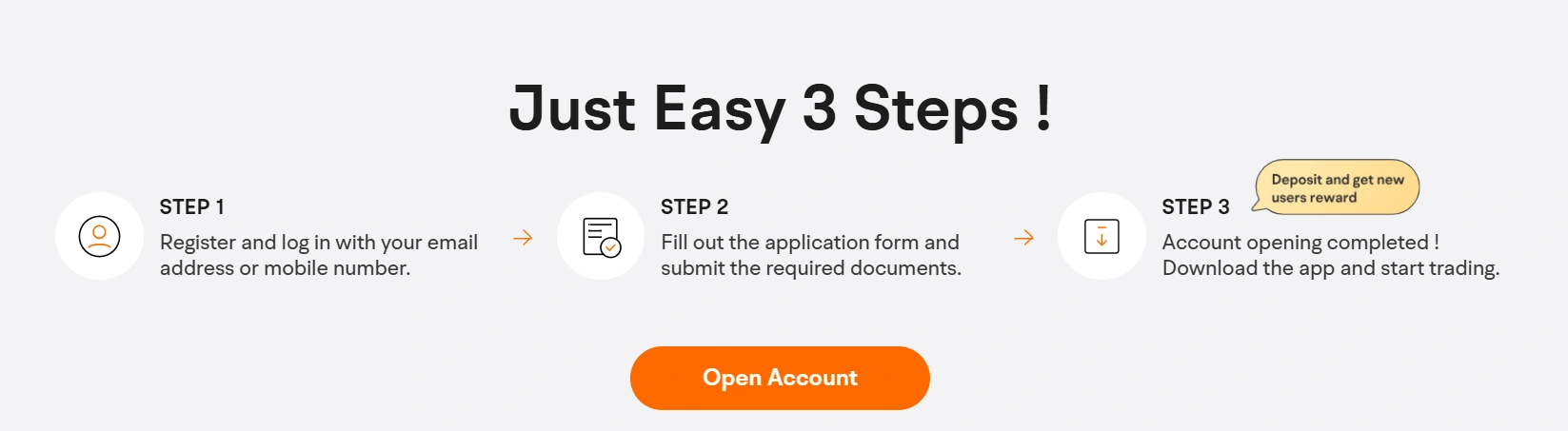
Once you've downloaded the app, tap "Sign Up" to create your account. You'll need to provide:
Your email address or phone number
A secure password
Basic personal information (name, date of birth, address)
Moomoo is available to Canadian residents who are 18 years of age or older. The sign-up process is designed to be completed entirely within the app — no paperwork or branch visits required.
Step 3: Verify Your Identity
As a CIRO-regulated brokerage, Moomoo is required to verify your identity before you can trade. You'll need to provide:
Your Social Insurance Number (SIN) — required for tax reporting purposes with the CRA
A valid government-issued photo ID (driver's licence or passport)
Proof of address (if requested)
Many beginners wonder why a trading platform needs their SIN. This is standard practice for all regulated Canadian brokerages — it's used for tax reporting on your investment gains and registered accounts (TFSA, RRSP).
Identity verification is typically completed within one business day, though many users report being approved within hours.
Step 4: Choose Your Account Type
Moomoo offers several account types for Canadian investors:
TFSA (Tax-Free Savings Account): Ideal for beginners — all investment gains are completely tax-free. Best for long-term growth.
RRSP (Registered Retirement Savings Plan): Contributions are tax-deductible, and investments grow tax-deferred until withdrawal. Best for retirement savings.
Cash Account (Non-Registered): A standard taxable investment account with no contribution limits. Good for additional investing beyond registered accounts.
Margin Account: Allows you to borrow funds to invest. Not recommended for beginners due to amplified risk.
Tip for beginners: If you have unused TFSA contribution room, start there. Every dollar of profit you earn inside a TFSA is completely tax-free — making it the best account type for new Canadian investors.
Step 5: Fund Your Account
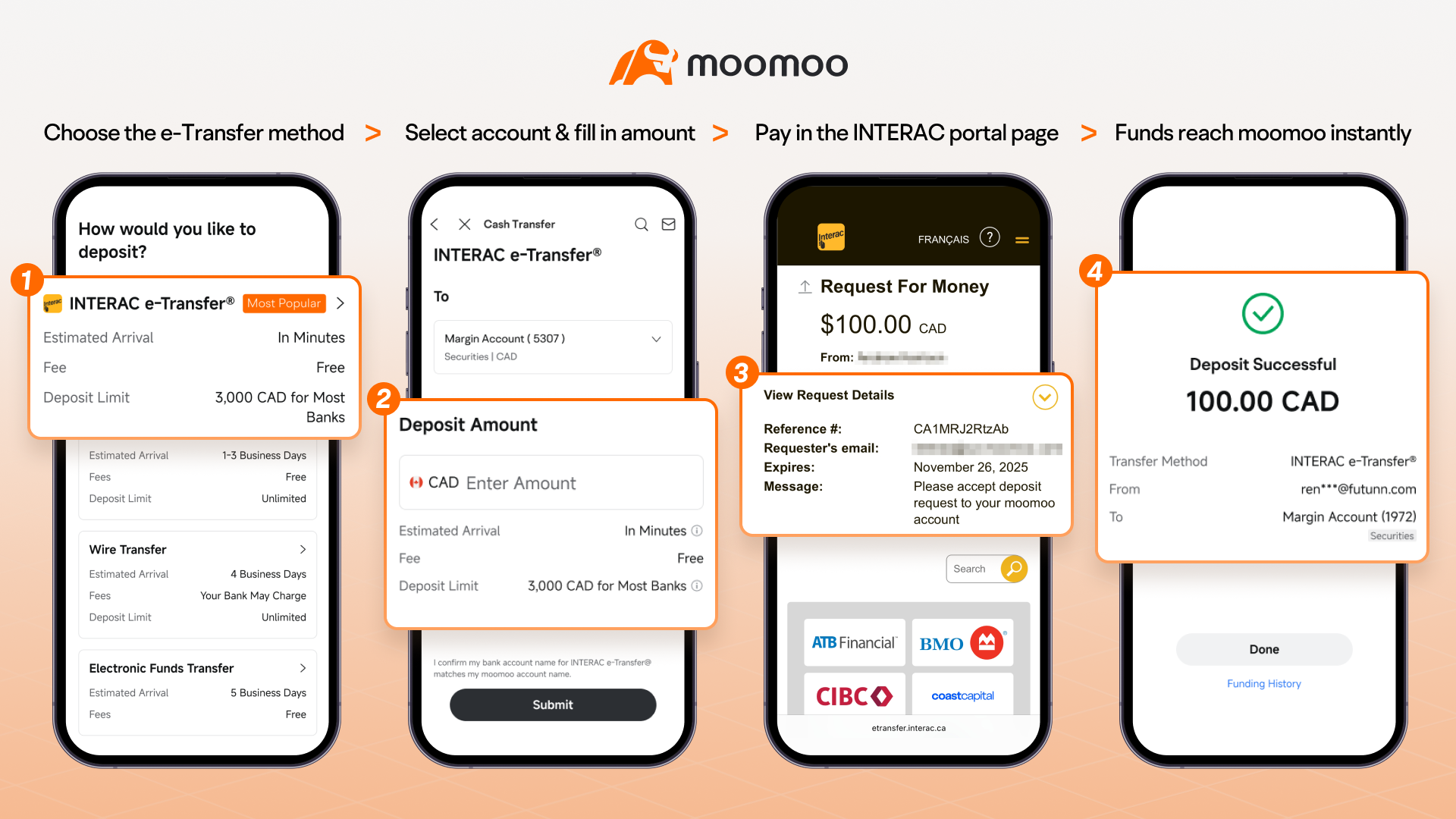
Once your account is approved, it's time to deposit money. Moomoo supports several funding methods for Canadian investors:
Electronic Funds Transfer (EFT): Link your Canadian bank account and transfer funds electronically. This is the most common method and typically takes 1–3 business days.
Wire Transfer: Faster but may involve bank fees. Ideal for larger deposits.
There's no minimum deposit required to open a Moomoo account, which means you can start with whatever amount you're comfortable with — even $50 or $100.
Pro tip: Moomoo offers instant buying power on EFT deposits, meaning you may be able to start trading before your funds fully settle — so you don't necessarily have to wait several days to place your first trade.
Step 6: Explore the Platform Before You Trade
Before jumping into your first trade, take time to explore Moomoo's features. Here's what to check out as a beginner:
Watchlist: Add stocks you're interested in tracking. Search for familiar companies (Apple, Shopify, TD Bank) and tap the "+" icon to add them to your list.
Paper Trading: Switch to Moomoo's paper trading mode to practice buying and selling with virtual money. This is the best way to learn the platform without any financial risk.
AI Research Tools: Use Moomoo's AI assistant to get quick summaries of stocks, earnings reports, and market trends — perfect for beginners who don't know where to start with research.
Learning Centre: Browse educational content built into the app covering topics from basic investing terminology to advanced options strategies.

Step 7: Place Your First Trade
When you're ready to buy your first stock or ETF, here's how to do it on Moomoo:
Search for a stock or ETF using the search bar (e.g., "XEQT" for a popular all-in-one ETF, or "AAPL" for Apple)
Tap "Trade" on the stock's detail page
Select "Buy"
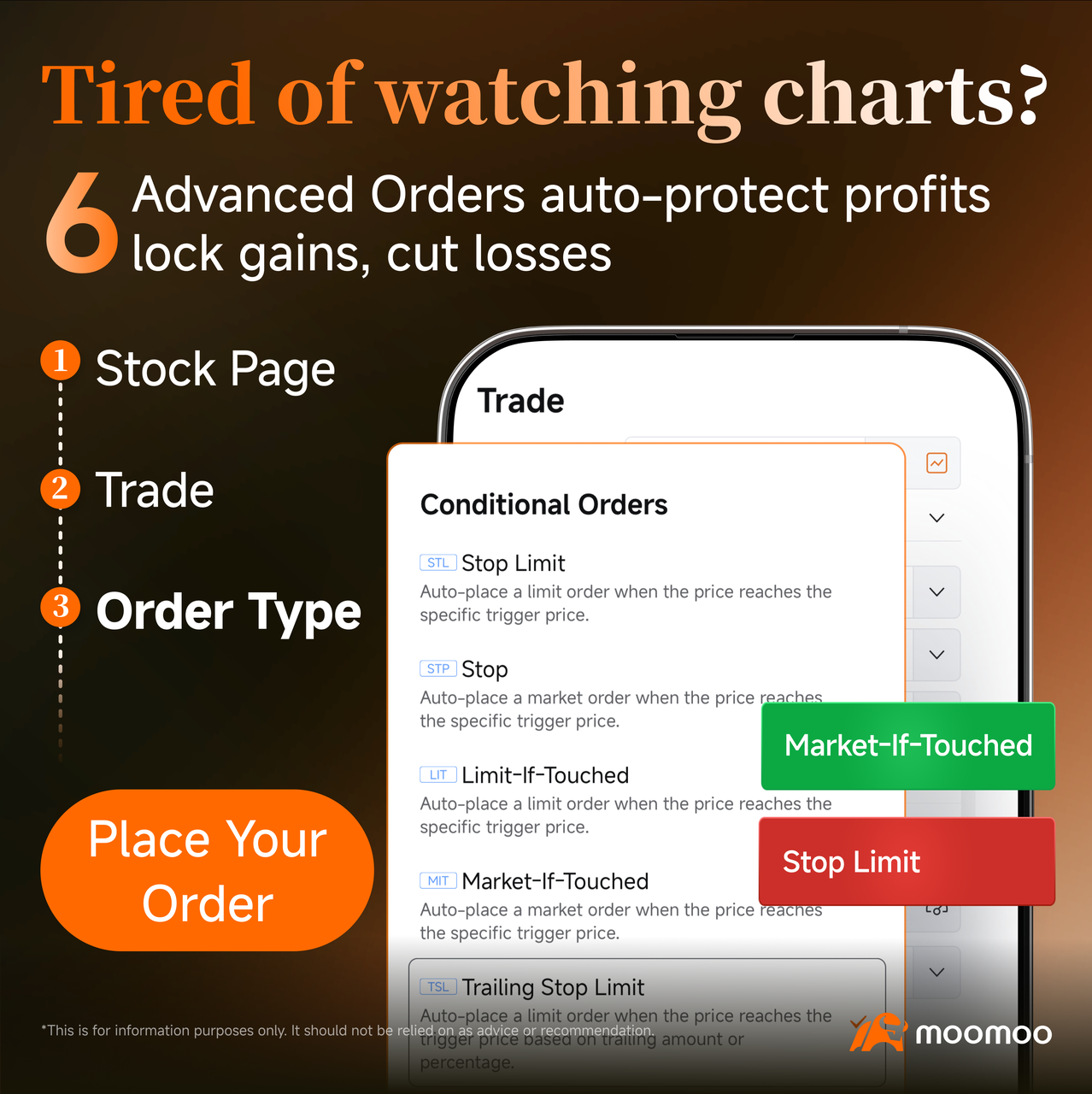
Choose your order type:
Market Order: Buys immediately at the current market price. Simplest option for beginners.
Limit Order: Sets the maximum price you're willing to pay. Gives you more control but may not execute immediately.
Enter the number of shares you want to purchase
Review and confirm your order
This presentation is for informational and educational use only and is not a recommendation or endorsement of any particular investment or investment strategy. Investment information provided in this content is general in nature, strictly for illustrative purposes, and may not be appropriate for all investors. Read more