• Investments
    • Moomoo Engine
    • Stocks
    • US Options
    • ETFs
  • Accounts
    • TFSA
    • RRSP & SRRSP
    • Margin
    • Cash
  • Market Analysis
    • Features
      • Paper Trading
      • Charts
      • Stock Analysis
      • Screeners
      • Heat Map
      • Level 2 Data
      • Earnings Calendar
      • Investment Themes
      • Institutional Tracker
      • Trading Tools
    • Real-time Quotes
      • US Stocks
      • CA Stocks
      • US Options
      • ETFs
      • Futures
      • Forex
  • Pricing
    • Pricing Overview
    • US Market Pricing
    • CA Market Pricing
  • Promotions
    • Welcome Bonus
    • Transfer Rewards - 4% Match
    • Top Trader Competition
    • Refer a Friend
    • Paper trading competition
  • Moomoo AI
    • AI Insights
    • Open API
    • Skills Hub
  • Community
    • Community
      • Latest Feed
      • Discussions
    • Trading News
      • Headlines
      • Latest
      • Financial Calendar
      • Topics
      • Video
    • Learn
      • Lessons
      • Trading Strategies
      • Smart Investing
      • Tutorials
      • Stock Analysis
    • Guides
      • Invest in US Stocks
      • Best Trading Platform
      • Explore SK Hynix Earnings
      • Top AI Memory Stocks
  • About Us
    • About moomoo >
      • Moomoo Highlights
      • Affiliate Program
      • Help Centre
      • Careers
      • Security and Privacy
    • Premier & Corporate Account Services >
      • Moomoo Premier
    • Moomoo Store >
      Yorkville
      95A Bloor Street West, Toronto, ON M5S 1M1
      Markham
      CF Markville 2F, 2151, 5000 Hwy 7, Markham, ON L3R 4M9
  • More
    • About Us
      • About moomoo
      • Premier & Corporate Account Services
      • Moomoo Store
  • English
  • 中文繁體
  • 中文简体
Download
Mobile
donwloadimg
Need Help?
Desktop
appLogo
Download now
View more versions
Sign up/Log in
English
Back
  • Investments
    • Moomoo Engine
    • Stocks
    • US Options
    • ETFs
  • Accounts
    • TFSA
    • RRSP & SRRSP
    • Margin
    • Cash
  • Market Analysis
    • Features
      • Paper Trading
      • Charts
      • Stock Analysis
      • Heat Map
      • Level 2 Data
      • Earnings Calendar
      • Investment Themes
      • Institutional Tracker
      • Trading Tools
    • Real-time Quotes
      • US Stocks
      • CA Stocks
      • US Options
      • ETFs
      • Futures
      • Forex
  • Pricing
    • Pricing Overview
    • US Market Pricing
    • CA Market Pricing
  • Promotions
    • Welcome Bonus
    • Transfer Rewards - 4% Match
    • Top Trader Competition
    • Refer a Friend
    • Paper trading competition
  • Moomoo AI
    • AI Insights
    • Open API
    • Skills Hub
  • Community
    • Community
      • Latest Feed
      • Discussions
    • Trading News
      • Headlines
      • Latest
      • Financial Calendar
      • Topics
      • Video
    • Learn
      • Lessons
      • Trading Strategies
      • Smart Investing
      • Tutorials
      • Stock Analysis
    • Guides
      • Invest in US Stocks
      • Best Trading Platform
      • Explore SK Hynix Earnings
      • Top AI Memory Stocks
  • About Us
    • About moomoo>
      • Moomoo Highlights
      • Affiliate Program
      • Help Centre
      • Careers
      • Security and Privacy
    • Premier & Corporate Account Services>
      • Moomoo Premier
    • Moomoo Store>
      • Yorkville
      • Markham
  • English
  • 中文繁體
  • 中文简体
  • Dark
  • Light
Download
Open Account
Need Help?
Log in to access Online Inquiry
Back to the Top
Featured ContentStocks
How to buy Dell (DELL) Stock in Canada?

How to buy Dell (DELL) Stock in Canada?

avatorSarah Brown11hours ago

Dell is a global technology company specializing in IT infrastructure, servers, storage, and personal computers for business and consumer markets. The stock has recently attracted investor attention due to surging demand in AI-optimized servers and robust financial results.

This guide explains the Dell share price outlook and details how to buy Dell stock in Canada via regulated platforms.

Dell Technologies (DELL) Stock Overview

Company stock nameDell Technologies
Stock ticker symbolDELL
Current Price$ 336.7
Change (%)-7.18% (-26.64)
Market Cap219.06B
P/E Ratio (TTM)20.04
Today's Range330.418 – 375.27
Volume9.62M
Where to buy Dell Technologies stockBUY ON MOOMOO

Source: moomoo data, as of Nov 15, 2026.

Can Canadians Buy Dell (DELL) Stock?

Yes, Canadians can buy Dell (DELL) stock by opening a self-directed brokerage account that provides access to US exchanges. However, investors must consider the impact of tax treatment, currency fluctuations, and currency exchange fees on their total returns before finalizing any trades.

Tax Optimization

When purchasing Dell shares, Canadian investors should carefully consider which account to use to maximize their tax efficiency. Holding US equities in either a Tax-Free Savings Account (TFSA) or a Registered Retirement Savings Plan (RRSP) provides distinct advantages. Understanding these cross-border tax rules helps structure your portfolio effectively to minimize unnecessary foreign tax drag on your investment income.

TFSA vs. RRSP: Under the Canada-US tax treaty, US dividends are subject to a 15% withholding tax when held in a TFSA. However, RRSPs are recognized as tax-exempt retirement accounts, meaning Dell dividends earned within an RRSP avoid this withholding tax entirely, making the RRSP a much more efficient option for dividend-paying US stocks.

Cost Efficiency

When Canadian investors look to acquire Dell shares, navigating the CAD-USD exchange rate is a crucial step. Unfortunately, hidden currency conversion spreads and foreign exchange fees can quietly erode your total investment returns over time.

To address this specific pain point, moomoo provides zero currency conversion fees, allowing you to trade Dell stock much more efficiently.

article image

Step-by-Step: How to Buy Dell Technologies (DELL) Stock in Canada

If you’re looking to invest and live in Canada, here’s a practical, straightforward guide to help you get started with how to buy Dell shares in Canada. This step-by-step process ensures you can buy Dell stock with confidence and clarity, no matter your experience level.

1

Step 1: Choose a Stock Trading Platform

Selecting the right broker is vital for Canadians buying US stocks. A great platform aligns perfectly with your unique trading style and budget when you buy Dell.

As the #1 US Stocks Trading Platform for Canadians, moomoo makes trading Dell incredibly straightforward. Boasting strict CIRO regulation, and knowing its parent company is Nasdaq-listed (NASDAQ: FUTU), provides users with the trusted, reliable environment needed for everyday investing.

article image
2

Step 2: Open the Right Account Type

Account TypeBest ForTax Implications
RRSPLong-term retirementExempt from 15% US withholding tax on Dell dividends.
TFSATax-free growthNo tax on gains; 15% withholding tax on Dell dividends.
CashGeneral investingGains and dividends from Dell are fully taxable.
MarginLeveraged tradingTaxable; interest on loans for Dell may be deductible.

📝 What You'll Need to Open an Account

✅ Government Photo ID
✅ Social Insurance Number (SIN)
✅ Proof of Address
✅ Employment Information
Open an Account
3

Step 3: Fund your account

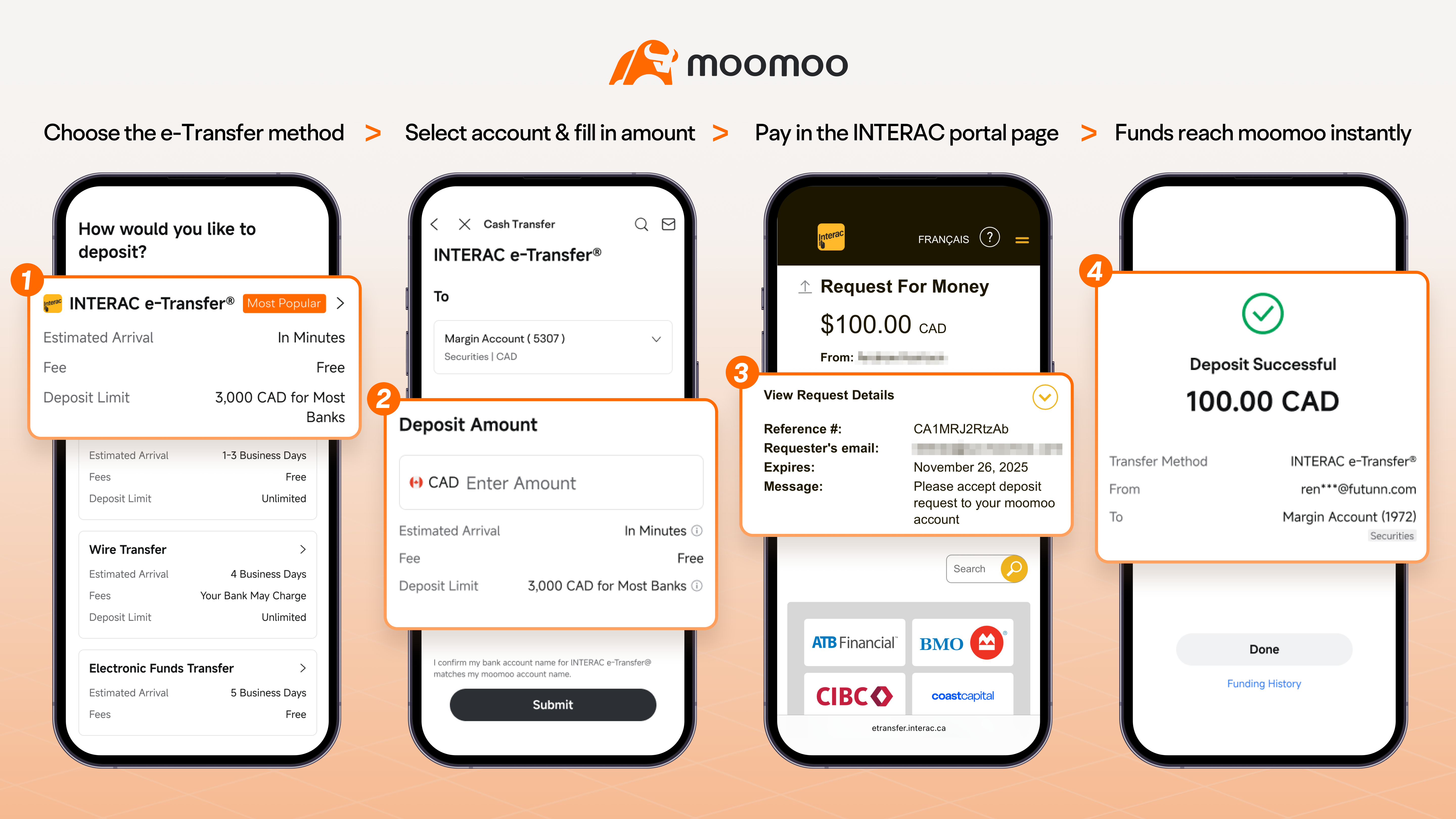
Before executing any trades, moving capital into your new brokerage account is a strict prerequisite. Having cleared funds ensures you are fully prepared to enter the market without execution delays.

To buy Dell stock efficiently, you can use Interac e-Transfer, wire transfer, direct deposit, or bill payment. Selecting the fastest processing option allows you to deploy your capital quickly.

Why Funding on moomoo is Different

When buying Dell or other US equities, currency conversion fees are often a "hidden killer" of investment returns. moomoo solves this specific pain point for Canadian investors:

  • Instant e-Transfers: Never miss a market move for Dell with near-instant deposit availability.
  • Zero Exchange Fees: Convert CAD to USD directly within the moomoo app without hidden markups.
  • Transparent Rates: Review real-time conversion rates before committing your capital to Dell shares.
Experience Low-Cost Trading
article image
4

Step 4: Search for Dell Technologies (DELL) Stock

Locate Dell using its ticker to conduct a multi-dimensional evaluation. Analyzing real-time price, volume, and trends decodes short-term momentum and broader market sentiment before you execute your trade.

Mastering market depth and liquidity is vital. Level 2 data reveals multiple layers of order flow beyond basic quotes, helping identify true support and resistance levels alongside institutional activity for precise entry and exit timing.

For superior cost-to-performance, moomoo provides free 60-level market depth. Its blazing 0.3s refresh rates deliver institutional-grade clarity that competing brokers typically charge for, transforming your execution strategy.

article image
5

Step 5: Place Your Dell (DELL) Stock Order

Choosing the correct order type is essential for a successful Dell trade because it manages execution price, controls risk, and optimizes your entry.

🎯 Order Type Selection

Market Order
Prioritizes speed for immediate entry. Executes at the best available current price.
Limit Order
You set the maximum buy price. Essential for protecting against Dell's price volatility.
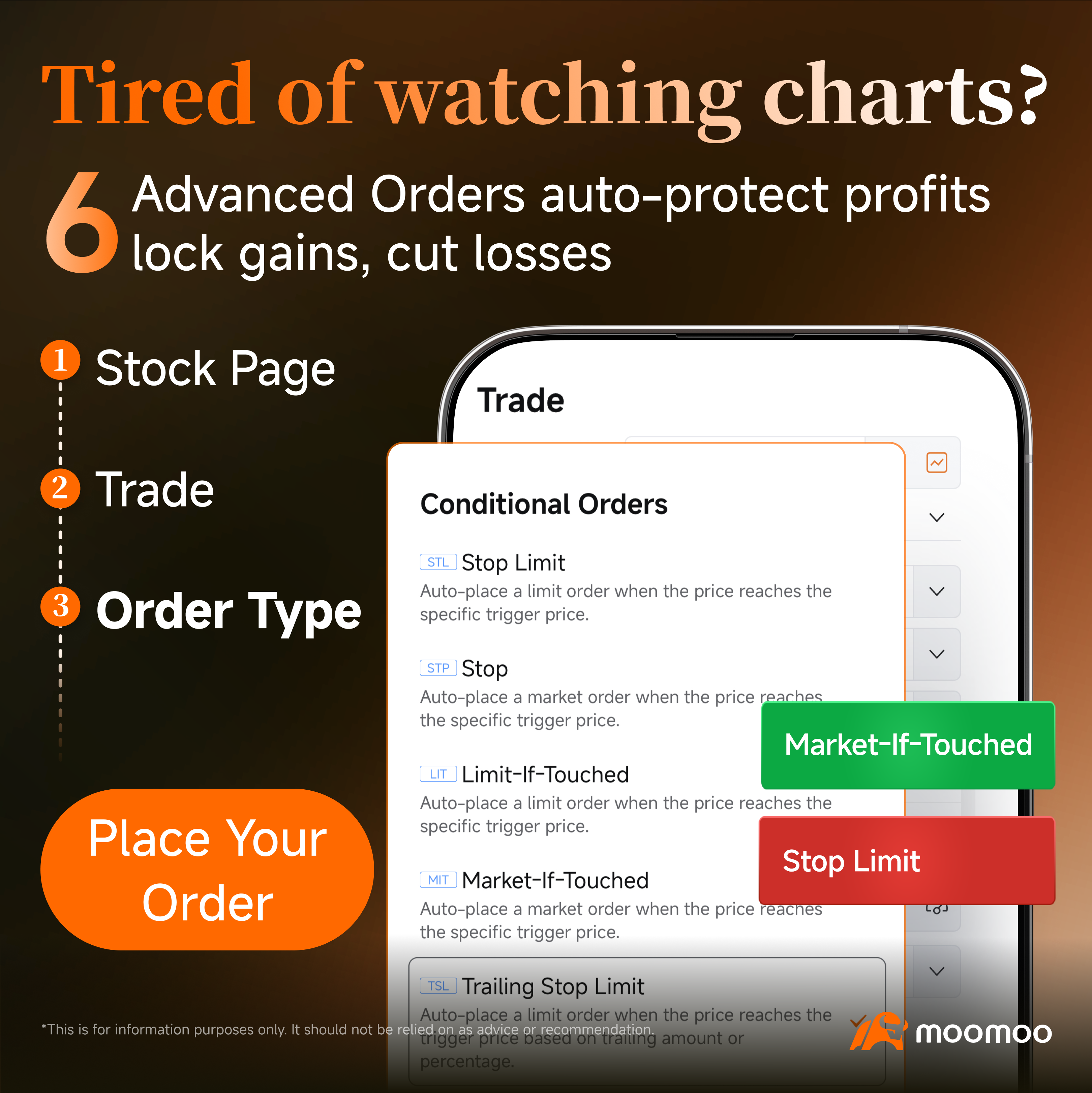
Exclusive 6 Advanced Order Types

Designed to support professional-grade conditional trading strategies.

These sophisticated tools allow you to execute trades at your preferred price and set specific automated conditions—removing the need for constant screen monitoring. Whether building a long-term position or trading actively, moomoo provides the advanced functionality required to trade Dell with institutional-grade precision.
article image

Dell (DELL) Stock Chart

Monitor the real-time price movements and comprehensive historical trends of Dell (DELL.US) through this interactive chart, designed to provide investors with essential market clarity and precise data visualization.

Is It a Good Time to Invest in Dell (DELL) Stock?

Deciding exactly when to buy Dell stock often feels overwhelming, as investors constantly wrestle with the fear of mistiming the market.

To navigate this uncertainty, the moomoo platform serves as a powerful bridge to professional clarity. By aggregating comprehensive institutional insights, moomoo provides traders with direct access to Wall Street analyst ratings, revealing how top financial minds evaluate the current landscape.

Evaluating this consensus data ultimately helps investors gauge broader market expectations, providing a clearer perspective before committing any precious capital.

Navigating the endless stream of Dell stock news can feel completely overwhelming, frequently causing hesitation when timing your entry.

As Canada's first AI-powered brokerage platform, moomoo provides the ideal cure for this information overload. By leveraging moomoo AI, the tool actively filters complex market noise and transforms extensive financial data into clear, easily digestible summaries for investors.

Relying on these AI-driven insights ensures you stay consistently informed and confident in volatile markets.

Download the app to try moomoo AI
article image

Why More Canadians Choose moomoo to Buy Dell Technologies (DELL) Stock?

Investing in Dell is a long-term journey, and it's natural to feel cautious before making any big financial decisions.

By adding Dell (DELL) to your watchlist in moomoo, you'll get:

🔔
Earnings Release Alerts Receive notifications for Dell's quarterly reports so you never miss a strategic opportunity.
⚡
Real-Time News Updates Access major developments and executive changes impacting Dell's price in real-time.
👥
Investor Community Discussions Join over 30 million users to see how others are analyzing and discussing Dell stock.

All these features are provided completely free. Join moomoo today and start your smarter, more professional investing journey.

Start Your Smarter Investing Journey Today

Experience professional-grade tools, real-time data, and a global community—all for free. Ready to trade DELL.US?

Get Started to Trade DELL.US with moomoo

Trusted by millions worldwide. Regulated by CIRO and CIPF protected.

FAQs about buying Dell stock

Q1. Can I buy Dell stock in Canadian dollars (CAD)?

While Dell trades on a US exchange in US dollars, Canadian investors can fund their brokerage accounts with Canadian dollars. The broker will automatically handle the currency conversion when executing the trade.

Q2. Has Dell stock ever split?

Yes, Dell has undergone a stock split in the past, such as the event in late 2021. Companies typically execute splits to adjust share liquidity without altering the total underlying business value.

Q3. How much is Dell stock worth?

The market value of Dell fluctuates daily during trading hours based on supply, demand, and ongoing financial performance. Investors evaluate its worth by observing the current share price and total market capitalization.

Q4. Does Dell pay dividends?

Yes, Dell has a history of paying regular cash dividends to its eligible shareholders. These corporate distributions are typically declared by the board of directors and paid out on a quarterly schedule.

FAQ

Moomoo Technologies Inc. is providing this content for information and educational use only. Read more


Disclaimer

This presentation is for informational and educational use only and is not a recommendation or endorsement of any particular investment or investment strategy. Investment information provided in this content is general in nature, strictly for illustrative purposes, and may not be appropriate for all investors. It is provided without respect to individual investors’ financial sophistication, financial situation, investment objectives, investing time horizon, or risk tolerance. You should consider the appropriateness of this information having regard to your relevant personal circumstances before making any investment decisions. Past investment performance does not indicate or guarantee future success. Returns will vary, and all investments carry risks, including loss of principal. Moomoo makes no representation or warranty as to its adequacy, completeness, accuracy or timeliness for any particular purpose of the above content. Moomoo is a financial information and trading app offered by Moomoo Technologies Inc. In the U.S., investment products and services available through the moomoo app are offered by Moomoo Financial Inc., a broker-dealer registered with the U.S. Securities and Exchange Commission (SEC) and a member of Financial Industry Regulatory Authority (FINRA)/Securities Investor Protection Corporation (SIPC). In Singapore, investment products and services available through the moomoo app are offered through Moomoo Financial Singapore Pte. Ltd. regulated by the Monetary Authority of Singapore (MAS). Moomoo Financial Singapore Pte. Ltd. is a Capital Markets Services Licence (License No. CMS101000) holder with the Exempt Financial Adviser Status. This advertisement has not been reviewed by the Monetary Authority of Singapore. In Australia, financial products and services available through the moomoo app are provided by Moomoo Securities Australia Limited, an Australian Financial Services Licensee (AFSL No. 224663) regulated by the Australian Securities and Investment Commission (ASIC). Please read and understand our Financial Services Guide, Terms and Conditions, Privacy Policy and other disclosure documents which are available on our website https://www.moomoo.com/au. In Canada, order-execution only services available through the moomoo app are provided by Moomoo Financial Canada Inc., regulated by the Canadian Investment Regulatory Organization (CIRO). In Malaysia, investment products and services available through the moomoo app are offered through Moomoo Securities Malaysia Sdn. Bhd. ("Moomoo MY") regulated by the Securities Commission of Malaysia (SC). Moomoo Securities Malaysia Sdn. Bhd. is a Capital Markets Services Licence (License No. eCMSL/A0397/2024) holder. This advertisement has not been reviewed by the SC. Moomoo Technologies Inc., Moomoo Financial Inc., Moomoo Financial Singapore Pte. Ltd., Moomoo Securities Australia Limited, Moomoo Financial Canada Inc., and Moomoo Securities Malaysia Sdn. Bhd. are affiliated companies.

Got It
avator

Sarah Brown

Skilled at stock analysis and price predict

Table of contents
Dell Technologies (DELL) Stock Overview
Can Canadians Buy Dell (DELL) Stock?
Step-by-Step: How to Buy Dell Technologies (DELL) Stock in Canada
Dell (DELL) Stock Chart
Is It a Good Time to Invest in Dell (DELL) Stock?
Why More Canadians Choose moomoo to Buy Dell Technologies (DELL) Stock?
Market Insights
Discover More Opportunities Discover More Opportunities
article-item-img
How to Buy SanDisk (SNDK) Stock in Canada
Sarah Brown ·Nov 14 12:31
article-item-img
How to Buy Micron (MU) Stock in Canada
Sarah Brown ·Oct 25 12:31
article-item-img
How to Buy Nvidia (NVDA) Stock in Canada
Sarah Brown ·Nov 16 12:31
article-item-img
How to Buy Advanced Micro Devices (AMD) Stock in Canada
Sarah Brown ·Nov 15 12:31
View More
Transfer Rewards - 4% Match Transfer Rewards - 4% Match
Star Tech Companies Star Tech Companies
Star Tech Companies
Featured Tech Stocks represent leading technology companies with strong market presence, influential in their industries, and notable for robust innovation and profitability. These firms are market leaders, significantly affecting the tech sector and broader economy. Featured Tech Stocks represent leading technology companies with strong market presence, influential in their industries, and notable for robust innovation and profitability. These firms are market leaders, significantly affecting the tech sector and broader economy.
No. Symbol 20D % Chg
Adobe
ADBE
+1.21%
Broadcom
AVGO
-0.11%
Apple
AAPL
+3.50%
4
Salesforce
CRM
-10.32%
5
Tesla
TSLA
+3.58%
Log In for the Full List
View More

- No more -

Customer Service
support@ca.moomoo.com
About moomoo
About moomoo
Newsroom
Terms & Conditions
Privacy Policy
Other Disclosures
Careers
Apply Now hr@ca.moomoo.com
Marketing partnerships
partnerships@ca.moomoo.com
Follow us on

Copyright © 2026 Moomoo Technologies Inc. All Rights Reserved.

Moomoo Store

Moomoo Store - Yorkville

Address:

95A Bloor Street West, Toronto, ON M5S 1M1

Opening Hours

Tuesday to Saturday: 11:00 - 18:30

Closed on Sundays, Mondays, and public holidays.

Moomoo Store - Markham

Address:

CF Markville 2F, 2151, 5000 Hwy 7, Markham, ON L3R 4M9

Opening Hours

Monday to Friday: 10:00 - 21:00

Saturday: 10:00 - 18:00

Sunday: 11:00 - 18:00

Copyright © 2026 Moomoo Technologies Inc. All Rights Reserved.