Don't forget to claim your gifts
Welcome gifts are available for every moomoo client. Here are the claiming instructions.
1、$0 commission
All moomoo clients with brokerage accounts can enjoy zero commission.
($0 commission trading is available to U.S. residents trading in the U.S. markets through Moomoo Financial Inc..
Singapore eligible clients can enjoy $0 commission trading in U.S. markets through Moomoo Financial Singapore Pte.Ltd..
Australian eligible clients can enjoy 180 days of $0 commission trading in the U.S. and Futu Securities (Australia) Ltd..)
How to check:
①Tap "Trade".
②Swipe right the toolbar and tap "More".
③Swipe down and tap "My Fees" via "Fee". You can view the commission-free status and the fee package.
2、Free US stock lv2 real-time quote
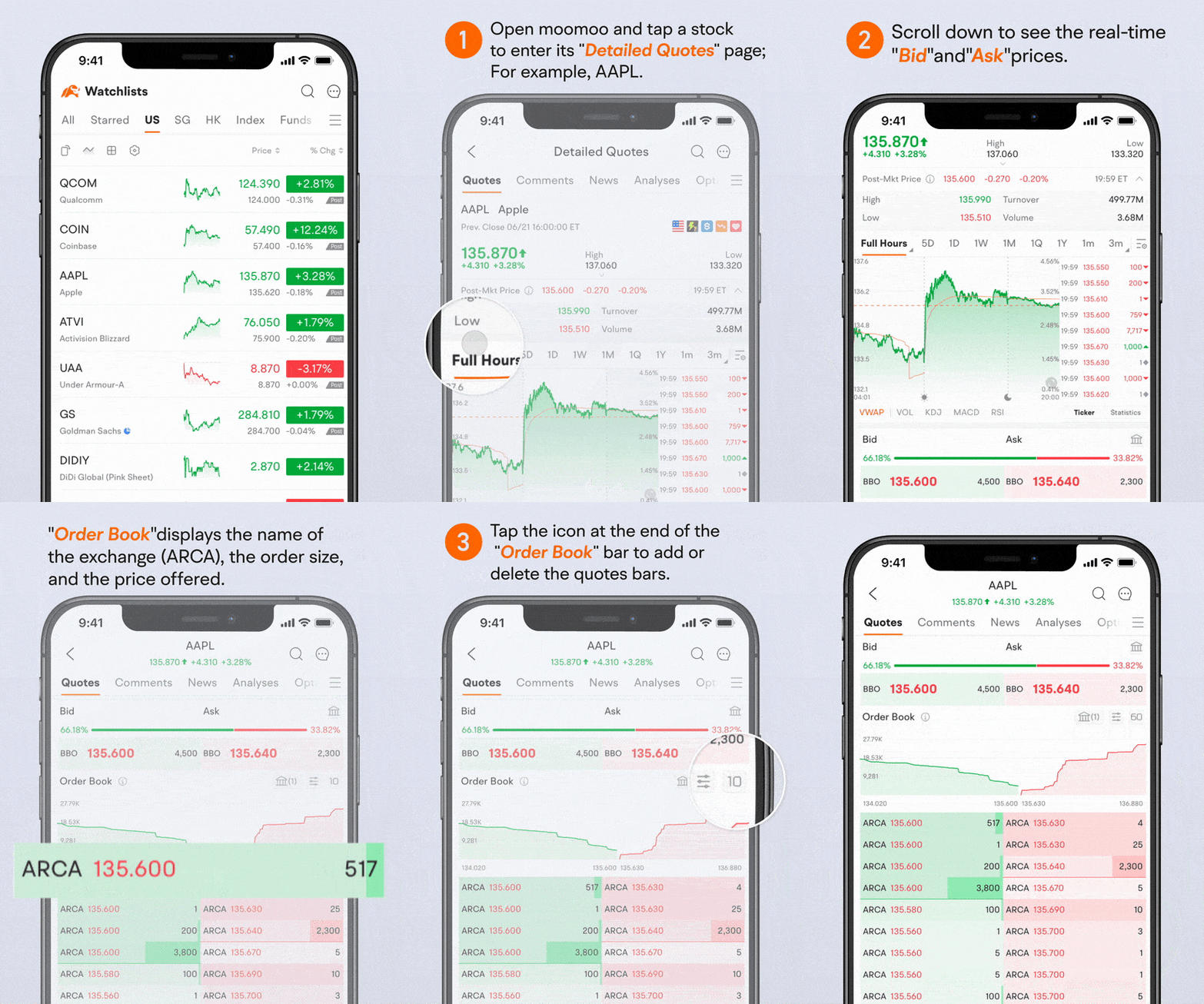
Moomoo now offers free US stock LV2 quotes (NSDQ Arcabook) to users with a brokerage account, which can assist traders in finding short-time support and resistance level according to real-time order books.
Steps:
①Open moomoo and tap a stock to enter its "Detailed Quotes" page; For example, AAPL.
②Scroll down to see the real-time "Bid" and "Ask" prices.
"Order Book" displays the name of the exchange (ARCA), the order size, and the price offered.
③Tap the icon at the end of the "Order Book" bar to add or delete the quotes bars.
Please note that the NSDQ ARCA does not cover all order information of the US stock market and is for reference only.
3、Coupons/Free Stocks
Clients who open brokerage accounts via time-limited activities may earn coupons or free stocks.
If you earned coupons, you can activate them via:
①Me > Coupons.
②On the "Coupons" page, you can see the coupons you have received so far.
Tap "Use" to use the coupons.
③Tap "Stocks Cards" to see the stock cards you have received so far.
Tap "Redeem" to redeem the corresponding amount of the specified stocks.
If you earned free stocks, you can check them via:
①Tap "Trade" and select an account.
②Swipe down to view the free stocks in the position or via "Pending gift stock".
This presentation is for informational and educational use only and is not a recommendation or endorsement of any particular investment or investment strategy. Investment information provided in this content is general in nature, strictly for illustrative purposes, and may not be appropriate for all investors. Read more