Moomoo Insights
Jul 16 15:38
TSMC Earnings: AI Demand Is Stronger Than the Chip Selloff Suggests
Moomoo Insights
Sep 30 05:04
Live Take | Anthropic’s $518B Compute Bet: Who Wins From the AI Buildout?
A bracket order is a type of attached order, comprising a buy order and a stop loss order. Once the parent order fills, either a profit taker or stop loss order will be submitted depending on which order meets the trigger price first. When one order fills, the other is canceled automatically.
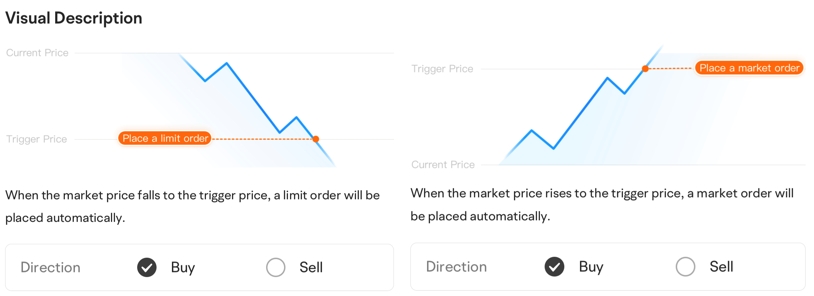
How to place a bracket order? It only takes the following four steps.
1. Go to a stock's Detailed Quotes page, and tap Trade.
2. Switch to the Pro mode, and tap Amount > Attached Order > Bracket.
3. Fill in the parent order, then enter the Profit Taker Limit Price and Stop Loss Stop Price, and choose the Time in Force.
Let's say X stock is at 310 USD per share. You could place a limit order to buy 100 shares of X stock at 300 USD per share and set a bracket order that Profit Taker Limit Price is 320, Stop Loss Stop Price is 280.
When the stock price falls below 280 USD, the Stop Loss Stop Order will be triggered automatically if the bracket order is still in effect.
4. Finally, tap Buy or Sell, and then confirm the Market Order Reminder and Order Detail.
Know more about Attached Order: Diversified order settings — make complex trading decisions easily
This presentation is for informational and educational use only and is not a recommendation or endorsement of any particular investment or investment strategy. Investment information provided in this content is general in nature, strictly for illustrative purposes, and may not be appropriate for all investors. Read more
Recommend
How to Use Level 2 market data

How to Use Short Sale Analysis

Short Sale Analysis – Quickly Identify Market Sentiment

Customize Strategy - Pick Stocks in 4 Steps
04.How to understand Backtesting?
02.Grid Trading Strategy
02.How to understand the Condition Card?
03.The Martingale Strategy
01.How to make Quantitative Trading on moomoo?
01.Double Moving Average Strategy
How to Paper Trade on moomoo
How to Use Heat List
How to Interpret 15 Technical Indicators with 1 Feature
How to Use Heat Map
03.How to understand the Operation Card?
How to Use Similar Charts
What is Algorithmic Trading?
How to Use Earnings Beat on moomoo
Free Real-Time Quotes: Have your Fingers on the Pulse of Short-Term Stock Prices
How to Custom Technical Indicators
Financial analysis – Graphical presentation of data, business performance at a glance
How to Diversify Order Settings
Identify Institutional Investor Moves with moomoo
How to Use Options Chain
How to Switch Trading Mode
Understanding divergence in technical analysis
Growth Stock Picking Strategy: CANSLIM
How to Place A Bracket Order
How to Manage Watchlist
How to trade with advanced order types?
How to trade ETFs on moomoo
How to Use Limit and Market Orders
How to Use Basic Order Types
How to Use Moomoo's Ticks Feature
How to discover potential entry points? Support and resistance help!
How to Do Financial Analysis
How to Use Stock Screener on moomoo?
How to Use Capital Tracking
How to Use Position Cost Distribution
How to Use Industrial Chain
How to place a basic order
How to Use Institutional Tracker
How to Use Options Screener
How to Use Level 2 market data
How to Use Short Sale Analysis
Short Sale Analysis – Quickly Identify Market Sentiment
Customize Strategy - Pick Stocks in 4 Steps
04.How to understand Backtesting?
02.Grid Trading Strategy
02.How to understand the Condition Card?
03.The Martingale Strategy
01.How to make Quantitative Trading on moomoo?
01.Double Moving Average Strategy
How to Paper Trade on moomoo
How to Use Heat List
How to Interpret 15 Technical Indicators with 1 Feature
How to Use Heat Map
03.How to understand the Operation Card?
How to Use Similar Charts
What is Algorithmic Trading?
How to Use Earnings Beat on moomoo
Free Real-Time Quotes: Have your Fingers on the Pulse of Short-Term Stock Prices
How to Custom Technical Indicators
Financial analysis – Graphical presentation of data, business performance at a glance
How to Diversify Order Settings
Identify Institutional Investor Moves with moomoo
How to Use Options Chain
How to Switch Trading Mode
Understanding divergence in technical analysis
Growth Stock Picking Strategy: CANSLIM
How to Place A Bracket Order
How to Manage Watchlist
How to trade with advanced order types?
How to trade ETFs on moomoo
How to Use Limit and Market Orders
How to Use Basic Order Types
How to Use Moomoo's Ticks Feature
How to discover potential entry points? Support and resistance help!
How to Do Financial Analysis
How to Use Stock Screener on moomoo?
How to Use Capital Tracking
How to Use Position Cost Distribution
How to Use Industrial Chain
How to place a basic order
How to Use Institutional Tracker
How to Use Options Screener