Moomoo Insights
Jul 16 15:38
TSMC Earnings: AI Demand Is Stronger Than the Chip Selloff Suggests
Moomoo Insights
Sep 30 05:04
Live Take | Anthropic’s $518B Compute Bet: Who Wins From the AI Buildout?
In stock trading, we track market actions through stock ticker data, which shows buy and sell orders at various prices.
These activities move stock prices and determine the closing price.
Ticks captures real-time market actions like trading prices and volumes and helps track institutional trader behavior, which may be useful for short-term trades.
Similarly, in options trading, ticks can be used to identify potential investment opportunities by showing where professional investors or large institutions, often referred to as "smart money," are directing their funds.
Although ticker isn't as widely used in options trading due to the unique nature of options, it remains useful for options with good liquidity.
For example:
A large-volume transaction using a multi-leg strategy likely indicates professional investor activity.
Trades executed via cross-market sweeps or floor trading methods are often from large institutions with specific strategies and purposes, offering significant reference value.
After identifying such orders, the Options Unusual Activity feature can provide additional records and indicators to further assess institutional market sentiment, aiding in more informed investment decisions.
Click to learn more about Options Unusual Activity>>
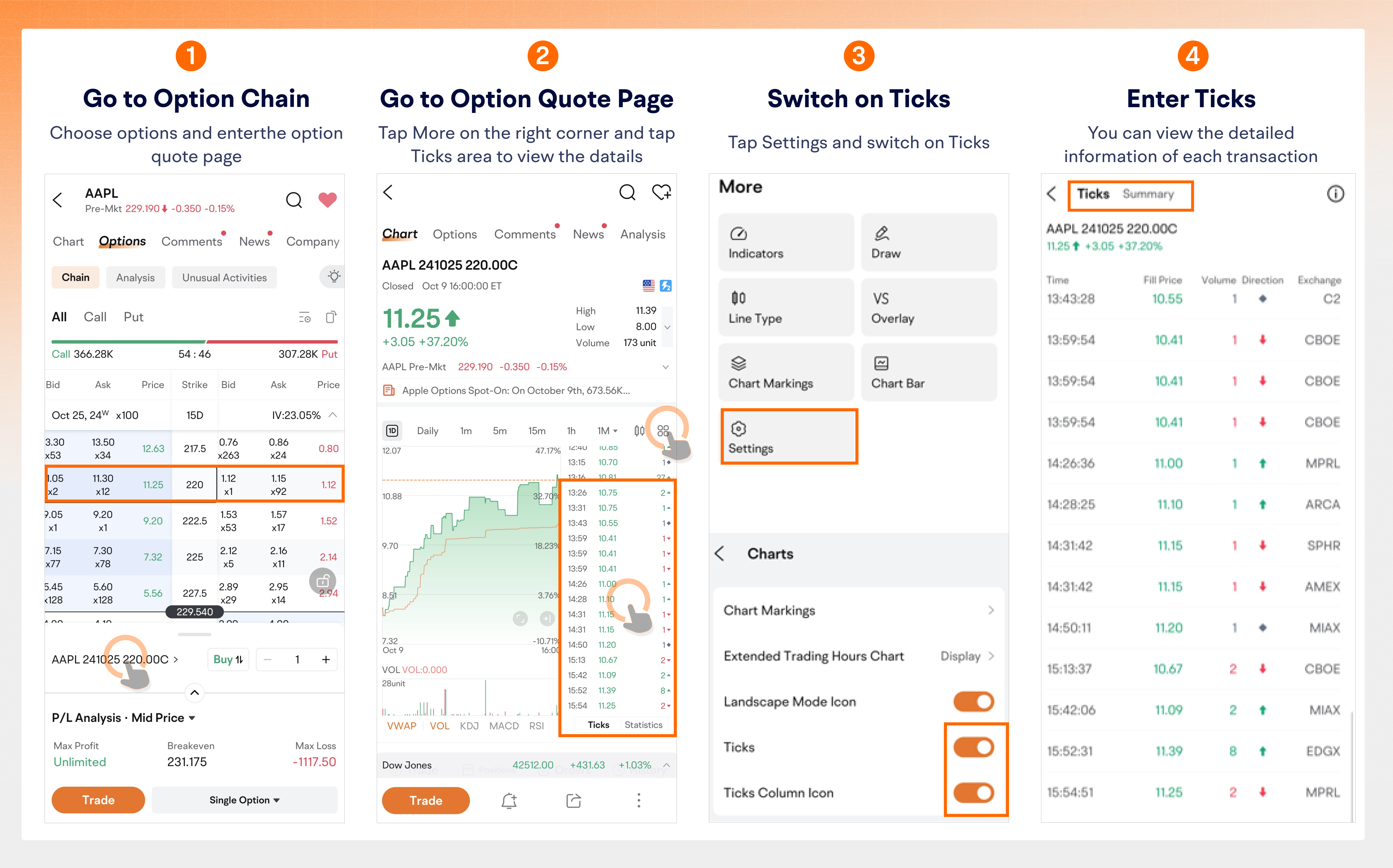
1. Navigate to the Ticker:
● Go to Options Chain > Double-click an option > Click ticks to the right of the candlestick chart.
2. Enable Ticker Data (if not visible):
● Go to the Chart page of the option > Click More at the right corner > Settings > Switch on Ticks.
● The Ticker Data area will appear to the right of the candlestick chart.
3. View Detailed Transaction Information:
● Click a tick > View more details about this transaction.
Finding detailed trade information can be overwhelming as it's often scattered across individual orders. To simplify this, Futubull offers Trade Summary, which consolidates all transactions into a visual format.
1. Access the Summary Page:
● Click the Summary button next to Ticks.
● Alternatively, swipe right on the interface to view a daily overview of transactions.
2. What's in Summary
● You can find a number of data, including average fill price, total number of transactions, total volume, transactions by exchange and contract quantities.
Note: Images provided are not current and any securities are shown for illustrative purposes only and is not a recommendation.
The color is based on the Previous Close price:
Higher than Previous Close: "Up Color"
Lower than Previous Close: "Down Color"
Customization: Users can set "Up/Down Colors" in Settings:
Red Up/Green Down
Green Up/Red Down
The color matches the Trade Direction color.
↑ Ask: Closer to the ask price; "Up Color"
↓ Bid: Closer to the bid price; "Down Color"
◆ Mid: Between bid and ask; gray
Customization: Users can set "Up/Down Colors" in Settings:
Red Up/Green Down
Green Up/Red Down
Single-leg: Basic buy/sell of a call/put option.
Multi-leg: Combines two or more options for a complex position.
Sweep: Large trades across multiple exchanges to get the best prices, indicating a strong view on the asset's price trend.
Cross: Matching buy/sell orders for the same security across different client accounts by a broker.
Floor: Trades conducted by professional traders on an exchange floor, often using advanced strategies.
Normal: Trades that don't fall into the Sweep, Cross, or Floor categories.
Code is a designator attached to every options trade, offering additional information about the trade.
Code | Explanation |
CANC | The trade previously reported, other than as the last or opening report for the particular option contract, is now to be cancelled. |
OSEQ | The trade is reported late and out of sequence, with later trades already reported for this option contract. |
CNCL | The trade is the last reported for the specific option contract and is now cancelled. |
LATE | The trade is reported late but is in the correct sequence, as no later trades have been reported for this options contract. |
CNCO | The first (opening) trade reported of the day for the specific options contract is to be cancelled, even though later trades have been reported. |
OPEN | The trade is a late report of the opening trade and is out of sequence, as other trades have been reported for this options contract. |
CNOL | The trade is the only one reported today for the specific options contract and is now to be cancelled. |
OPNL | The trade is a late report of the opening trade but is in the correct sequence, as no other trades have been reported for this options contract. |
AUTO | The trade was executed electronically. The prefix is for informational purposes only and will be processed as a regular trade. |
REOP | The trade is a reopening of an options contract that was previously halted. The prefix is for informational purposes only and should be processed as a regular trade. |
ISOI | The trade executed an order identified as an Intermarket Sweep Order and should be processed like a normal trade. |
SLAN | The trade executed an electronic order "stopped" at a price and traded in a two-sided auction mechanism with an exposure period. Such mechanisms include, but are not limited to, Price Improvement, Facilitation, or Solicitation Mechanism. |
SLAI | A trade executing an Intermarket Sweep electronic order "stopped" at a price and traded in a two-sided auction mechanism with an exposure period. Auction mechanisms include, but are not limited to, Price Improvement, Facilitation, or Solicitation Mechanism marked as ISO. |
SLCN | A trade executing an electronic order "stopped" at a price and traded in a two-sided crossing mechanism without an exposure period. Crossing mechanisms include, but are not limited to, Customer to Customer Cross and QCC with a single option leg. |
SCLI | A trade executing an Intermarket Sweep electronic order "stopped" at a price and traded in a two-sided crossing mechanism without an exposure period. Crossing mechanisms include, but are not limited to, Customer to Customer Cross. |
SLFT | A non-electronic trade executed on a trading floor, including the execution of Paired and Non-Paired Auctions and Cross orders. |
MLET | Transaction represents an electronic execution of a multi leg order traded in a complex order book. |
MLAT | A trade executing an electronic multi-leg order "stopped" at a price and traded in a two-sided auction mechanism with an exposure period in a complex order book. Auction mechanisms include, but are not limited to, Price Improvement, Facilitation, or Solicitation Mechanism. |
MLCT | A trade executing an electronic multi-leg order "stopped" at a price and traded in a two-sided crossing mechanism without an exposure period. Crossing mechanisms include, but are not limited to, Customer to Customer Cross and QCC with two or more options legs. |
MLFT | A non-electronic multi-leg order trade executed against other multi-leg orders on a trading floor, including Paired and Non-Paired Auctions and Cross orders. |
MESL | Transaction represents an electronic execution of a multi Leg order traded against single leg orders/ quotes. |
TLAT | A trade executing an electronic multi-leg stock or options order "stopped" at a price and traded in a two-sided auction mechanism with an exposure period in a complex order book. Auction mechanisms include, but are not limited to, Price Improvement, Facilitation, or Solicitation Mechanism. |
MASL | A trade executing an electronic multi-leg order "stopped" at a price and traded in a two-sided auction mechanism with an exposure period, trading against single-leg orders/quotes. Auction mechanisms include, but are not limited to, Price Improvement, Facilitation, or Solicitation Mechanism. |
MFSL | A non-electronic multi-leg order trade executed on a trading floor against single-leg orders/quotes, including Paired and Non-Paired Auctions. |
TLET | Transaction represents an electronic execution of a multi leg stock/options order traded in a complex order book. |
TLCT | A trade executing an electronic multi-leg stock/options order "stopped" at a price and traded in a two-sided crossing mechanism without an exposure period. Such crossing mechanisms include and not limited to Customer to Customer Cross. |
TLFT | A non-electronic multi-leg stock/options order trade executed on a trading floor in a complex order book, including Paired and Non-Paired Auctions and Cross orders. |
TESL | Transaction represents an electronic execution of a multi Leg stock/options order traded against single leg orders/ quotes. |
TASL | A trade executing an electronic multi-leg stock/options order "stopped" at a price and traded in a two-sided auction mechanism with an exposure period, trading against single-leg orders/quotes. Auction mechanisms include, but are not limited to, Price Improvement, Facilitation, or Solicitation Mechanism. |
TFSL | A non-electronic multi-leg stock/options order trade executed on a trading floor against single-leg orders/quotes, including Paired and Non-Paired Auctions. |
CBMO | Execution of a non-electronic proprietary product multi-leg order with at least three legs, potentially trading at a price outside the current NBBO. |
MCTP | Execution of a proprietary product as part of a multilateral compression trade, executed outside of regular trading hours at prices derived from end-of-day markets, not updating Open, High, Low, and Closing Prices. |
EXHT | A trade executed outside of regular market hours, not updating Open, High, Low, and Closing Prices. |
Exchange | Link |
AMEX | |
BOX | |
CBOE | |
EMLD | |
EDGX | |
GEMX | |
ISE | |
MRX | |
MIAX | |
ARCA | |
MPRL | |
NSDQ | |
BX | |
C2 | |
PHLX | |
BZX | |
MEMX | |
SPHR |
Function and Use: Options Ticks allows traders to monitor both real-time and historical price movements. By visualizing and analyzing statistical data, investors can easily access key information and base their strategies on market trends.
Target Audience: Retail investors who struggle to access market information and traders interested in short-term trading.
Risks: Distinguishing between trades by retail and institutional investors using current indicators may not always be accurate. Investors can also not directly determine if the trade is an opening or closing trade from the option ticks.
For options with low liquidity, relying solely on historical transaction prices to forecast future movements may not be reliable.
This presentation is for informational and educational use only and is not a recommendation or endorsement of any particular investment or investment strategy. Investment information provided in this content is general in nature, strictly for illustrative purposes, and may not be appropriate for all investors. Read more
Recommend

Master 5 Terms to Read an Options Chain

Master these 5 terms to confidently read an options chain

Avoid the trap: don’t buy cheap options blindly

Exercise, Let expire or Close. Three Smart Moves
Avoid pitfalls: expiration choices explained
Open Interest Analysis: How to potentially grasp the market's capital flow?
moomoo Product Roadshow
The Most Expensive Lessons in Options
Educational Deep Dive Volatility, Greeks & Option Pricing
0DTE Tool, Hedge, or Speculation
10-Minute Guide to Understanding Options
How to Place Option Orders on Moomoo Desktop
Options Seller Dashboard:Quickly Find High-ROI Options Contracts
How to Analyze an Option in depth
Understanding Options : A Beginner's Guide
Top 0DTE Options by Volume: Start Trading Mag 7 Stock Options Today
Volatility Analysis: IV / HV / IV Rank / IV Percentile
Gamma Exposure (GEX): Understanding Dealer Hedging Flows, and Key Levels
Volatility Analysis: How to estimate an option's value more accurately?
Options Unusual Activity: how to potentially monitor the moves of institutional investors
Options Ticks: Capture real-time options market actions
Options Price Calculator: How to calculate the future price of an option
Options P/L Curve Tutorial: Simulate your Options Trade to Visualize Potential Profit and Loss
Volatility Analysis: Volatility Term Structure / Volatility Smile
Understanding Call and Put Options
Master 5 Terms to Read an Options Chain
Master these 5 terms to confidently read an options chain
Avoid the trap: don’t buy cheap options blindly
Exercise, Let expire or Close. Three Smart Moves
Avoid pitfalls: expiration choices explained
Open Interest Analysis: How to potentially grasp the market's capital flow?
moomoo Product Roadshow
The Most Expensive Lessons in Options
Educational Deep Dive Volatility, Greeks & Option Pricing
0DTE Tool, Hedge, or Speculation
10-Minute Guide to Understanding Options
How to Place Option Orders on Moomoo Desktop
Options Seller Dashboard:Quickly Find High-ROI Options Contracts
How to Analyze an Option in depth
Understanding Options : A Beginner's Guide
Top 0DTE Options by Volume: Start Trading Mag 7 Stock Options Today
Volatility Analysis: IV / HV / IV Rank / IV Percentile
Gamma Exposure (GEX): Understanding Dealer Hedging Flows, and Key Levels
Volatility Analysis: How to estimate an option's value more accurately?
Options Unusual Activity: how to potentially monitor the moves of institutional investors
Options Ticks: Capture real-time options market actions
Options Price Calculator: How to calculate the future price of an option
Options P/L Curve Tutorial: Simulate your Options Trade to Visualize Potential Profit and Loss
Volatility Analysis: Volatility Term Structure / Volatility Smile
Understanding Call and Put Options