How to Use SmartSave
What is SmartSave
SmartSave is an idle fund management service provided by moomoo that automatically subscribes and redeems funds.
By enabling SmartSave, the idle cash in your account will automatically be invested in your selected fund in Cash Plus at 07:00 AM on each business day to maximise returns, with holdings counted as purchasing power and directly available for stock trading, IPO subscriptions, and more. There's no need for manual redemption, ensuring you won't miss any investment opportunities.

How to activate SmartSave
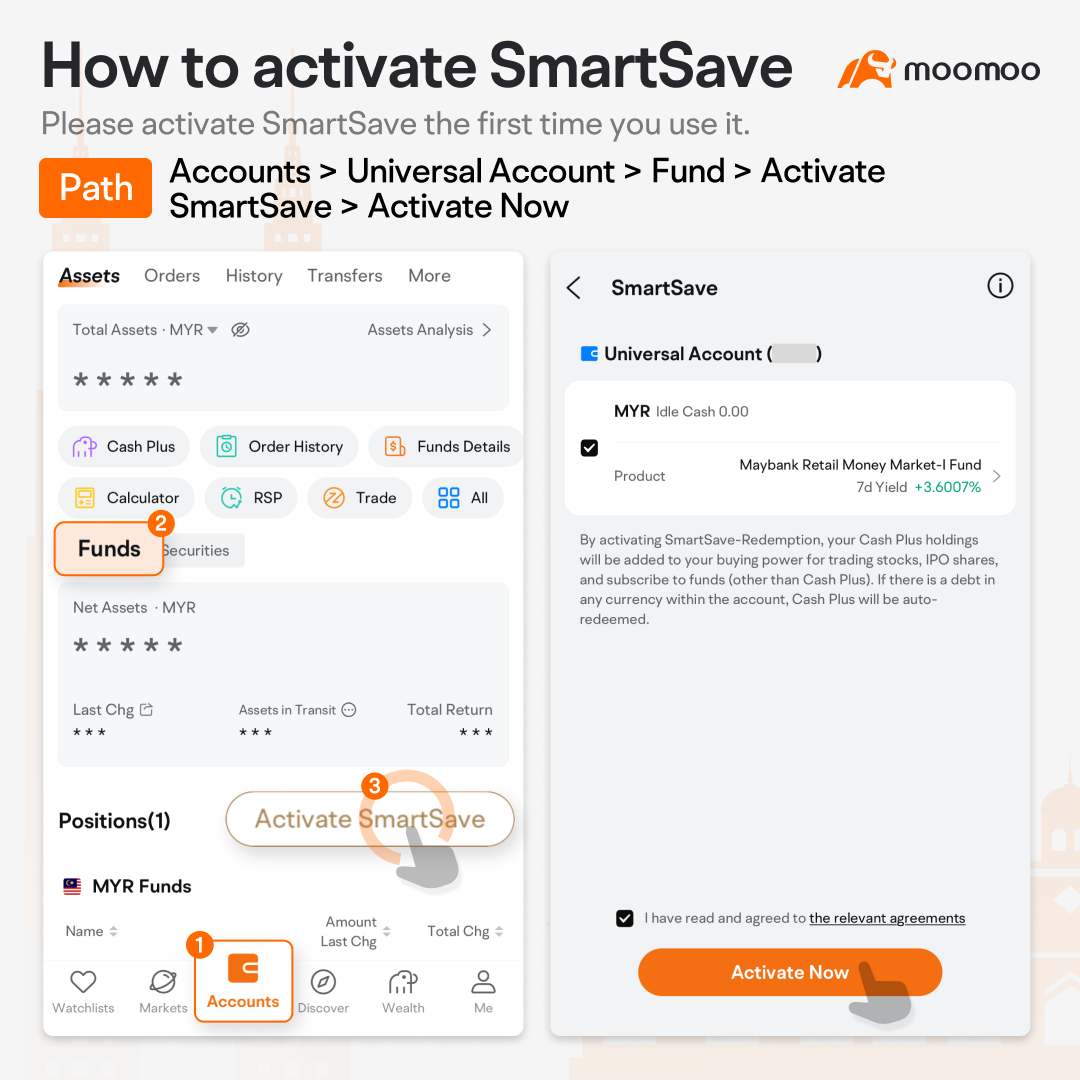
Please activate SmartSave when using it for the first time.
Accounts >Universal Account > Fund > Activate SmartSave > Activate Now.
How to manage SmartSave
You can start or pause the SmartSave service at any time.
Accounts >Universal Account > Fund > Management SmartSave.

How to set reserved amount
SmartSave > Product > SmartSave Settings > Amount Reserved.
The reserved amount refers to the cash amount you wish to keep in your account.
By accessing the automatic subscription and redemption settings, you can specify your reserved amount or reserved percentage. Subsequently, only the cash amount beyond the reserved amount will be automatically invested in Cash Plus.

How to select products
SmartSave > Product > SmartSave Settings > Product.SmartSave only allows products in Malaysian Ringgit. You can select or change your products in SmartSave settings.

View earnings and order history
Path1: Go to Assets > Funds > Positions to check earnings.
Path2: Check the order history for automatic purchases and redemptions under the Orders and History tabs.

This presentation is for informational and educational use only and is not a recommendation or endorsement of any particular investment or investment strategy. Investment information provided in this content is general in nature, strictly for illustrative purposes, and may not be appropriate for all investors. Read more