Trade Smarter with AI: A Quick Start Guide to Moomoo Skills
Imagine you have a 24/7 personal investment assistant: one that monitors hundreds of stocks in real time, automatically filters news highlights, and precisely executes trades right on your command.
This isn't out of reach. Moomoo Skills make it a reality.
By installing Moomoo Skills on your AI Agent (like OpenClaw, Claude Code, or Cursor), Moomoo's pro trading features plug directly into your AI. Instantly, your AI gains "eyes" to watch the market, "ears" to catch the news, and "hands" to execute trades—transforming from a simple chatbot into a real digital trader working for you.
This guide breaks down what Moomoo Skills can do, where to use them, and how they work together.
What Are Moomoo Skills?
Skills are plugins that give AI Agents specific professional capabilities. Think of AI as the brain — Skills are the "eyes" that read live market data, the "ears" that listen to market news, and the "hands" that execute trades.
Moomoo Skills connect directly to real brokerage trading systems and professional market data sources. When you ask, 'How is Apple doing recently?', it delivers live market data, the latest announcements, and community discussions straight from the moomoo platform—not second-hand information scraped from the web."
How Is This Different from Moomoo AI?
You may already use moomoo AI for data lookups, market analysis, and portfolio check-ups — it's great for that. But at its core, it's a predefined interactive flow set by the platform. Moomoo Skills are different:
Comparison | Moomoo Skill (For AI Agent) | |
Customization | Fixed features; Q&A only | Fully customizable; supports complex logic |
Environment | Inside Moomoo App | Local terminal; supports custom scripts |
Automation | Manual execution | Automated; supports scheduled monitoring |
Openness | Closed system | Supports Claude Code, Cursor, and other Agents |
In short, Moomoo AI is "ready to use," and Skills are "use however you want." For users who want to deeply customize their investment workflow, that's a fundamental difference.
What Can Moomoo Skills Do?
From live quotes and trading to news analysis and multi-dimensional market signals, Moomoo Skills cover the complete investment decision chain.
1. Quotes & Trading
moomoo-api skill
Skill details: https://www.moomoo.com/skillhub/openapi
The two most fundamental things in investing: seeing prices and placing orders. Moomoo Skills provide complete capabilities on both fronts.
Market data: Query live quotes, K-line charts, order books, tick-by-tick trades, and intraday data through natural language. Data comes directly from moomoo's market system, covering US, Hong Kong, China A-shares, Singapore, and Japan markets.
Try saying:
"What's Tesla's current price? Did it go up or down today?"
"Show me the 30-day daily chart for Micron (MU)."
"What does Nvidia's order book look like right now?"
These requests will return professional-grade market data — exactly like what you see in the Moomoo App.
Trade execution: moomoo-api skill supports 13 order types, including limit orders, market orders, stop-loss orders, trailing stop orders, auction orders, and more — covering the needs of most trading strategies.
Execute complete trading operations in natural language:
"Buy 100 shares of Apple at a limit price of $180."
"Cancel the Tesla order I placed yesterday."
"Check my US portfolio — which positions are down more than 10%?"
From checking quotes, placing, modifying, and canceling orders, to checking positions and funds — the entire trading loop happens in one conversation, without switching between AI and the trading app.
2. Content Analysis
Just looking at the price isn't enough; making smart investment decisions means understanding the why behind it. Moomoo Skills is perfect for this: it doesn't just help you 'find the news,' it actually 'highlights the key points and breaks them down for you.'
News Search (moomoo-news-search skill)
Skill details: https://www.moomoo.com/skillhub/news_search
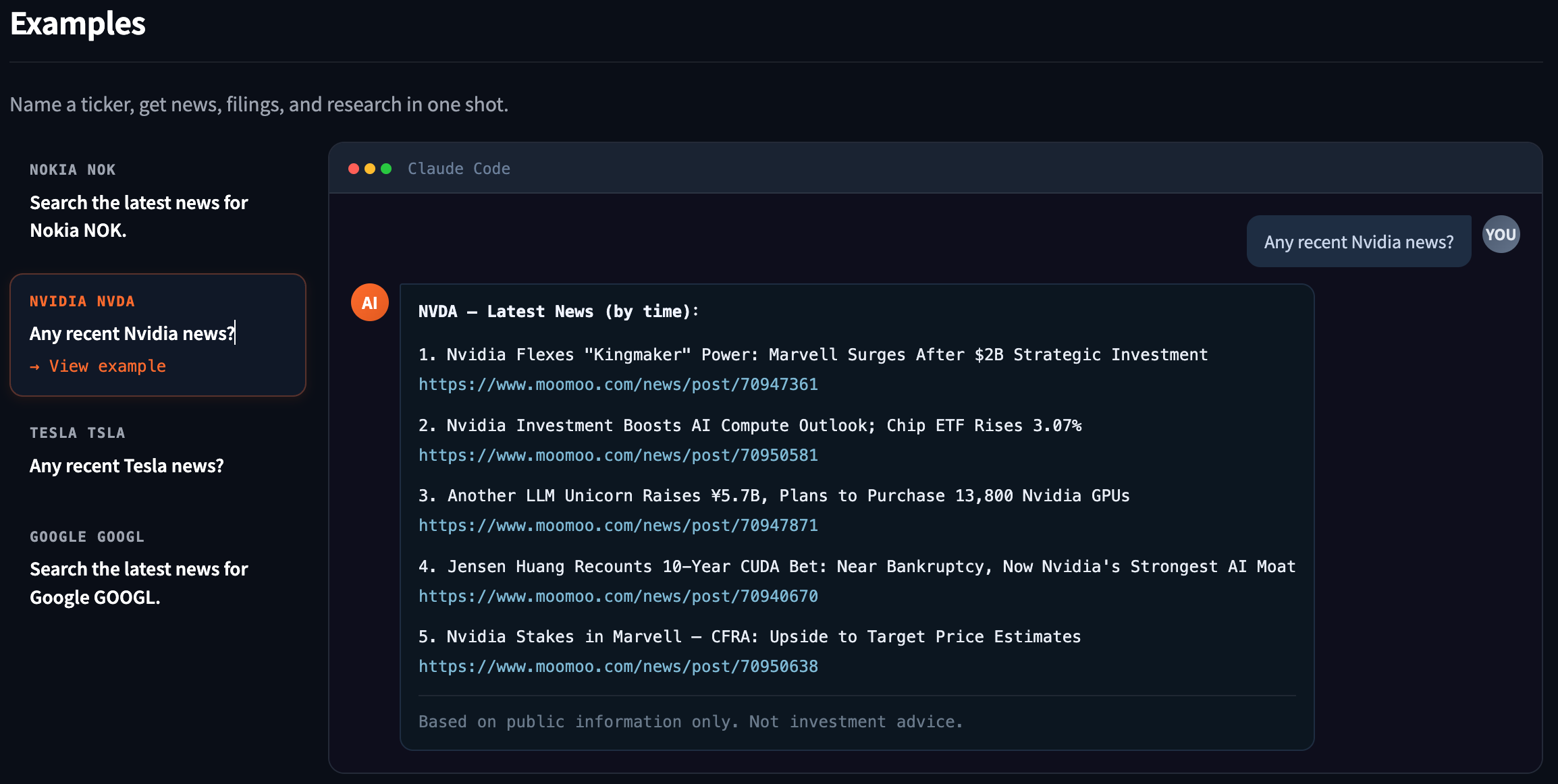
Search news, announcements, and reports directly on the moomoo platform. One sentence is all it takes to find what you're looking for.
"Any recent news on Tesla?"
"What's the latest on Google (GOOGL)?"
Stock Digest (moomoo-stock-digest skill)
Skill details: https://www.moomoo.com/skillhub/stock_digest
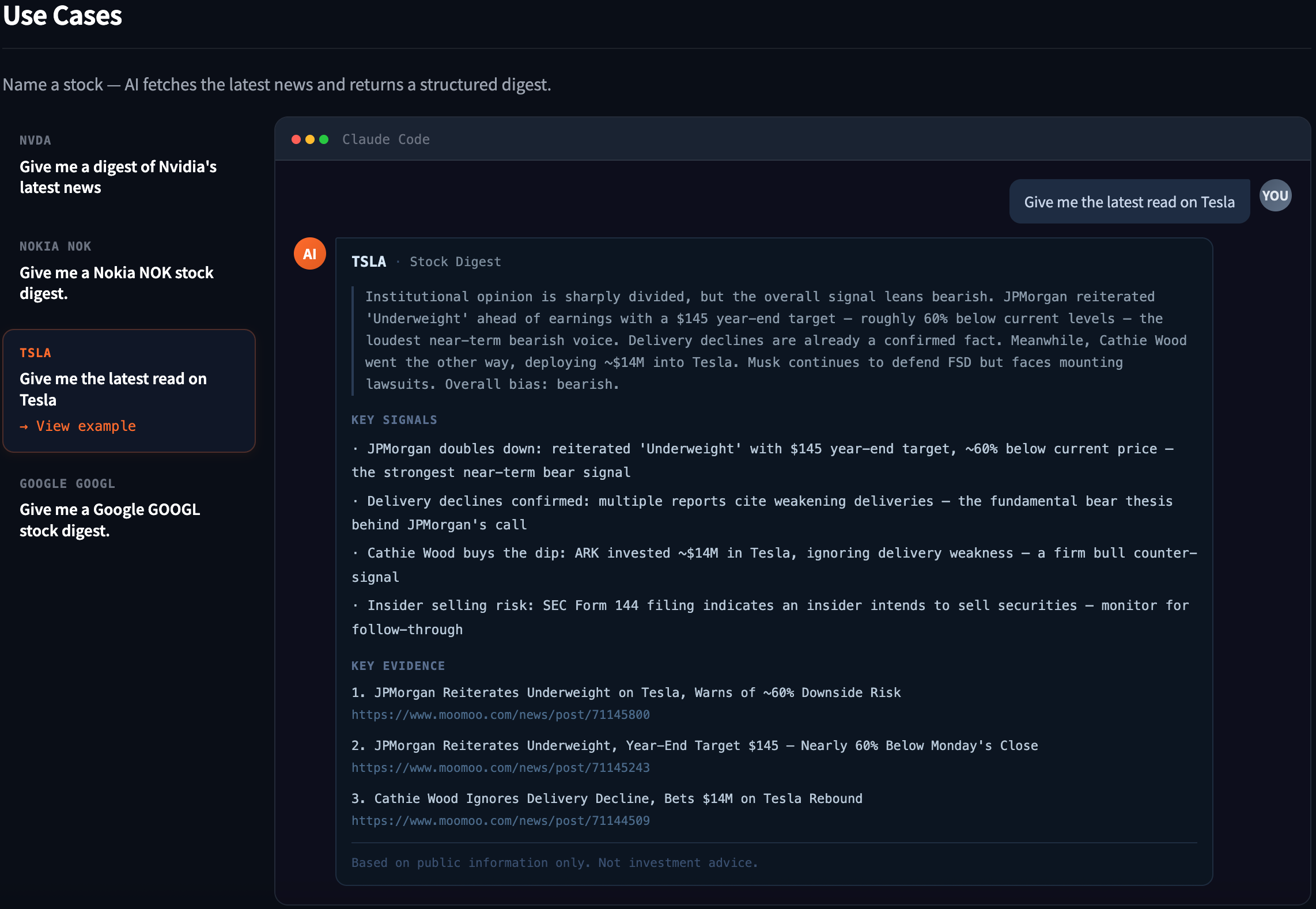
When you want a quick read on what's been happening with a stock and what the market thinks, Stock Digest condenses the latest news into a structured summary — covering key events, directional analysis, and source links.
"Give me the latest digest on Tesla."
"Help me understand the latest developments for Nvidia (NVDA)."
You get a distilled summary of the essentials, not a raw news list — everything you need to understand a stock's latest situation in seconds.
Sentiment Gauge (moomoo-comment-sentiment skill)
Skill details: https://www.moomoo.com/skillhub/comment_sentiment
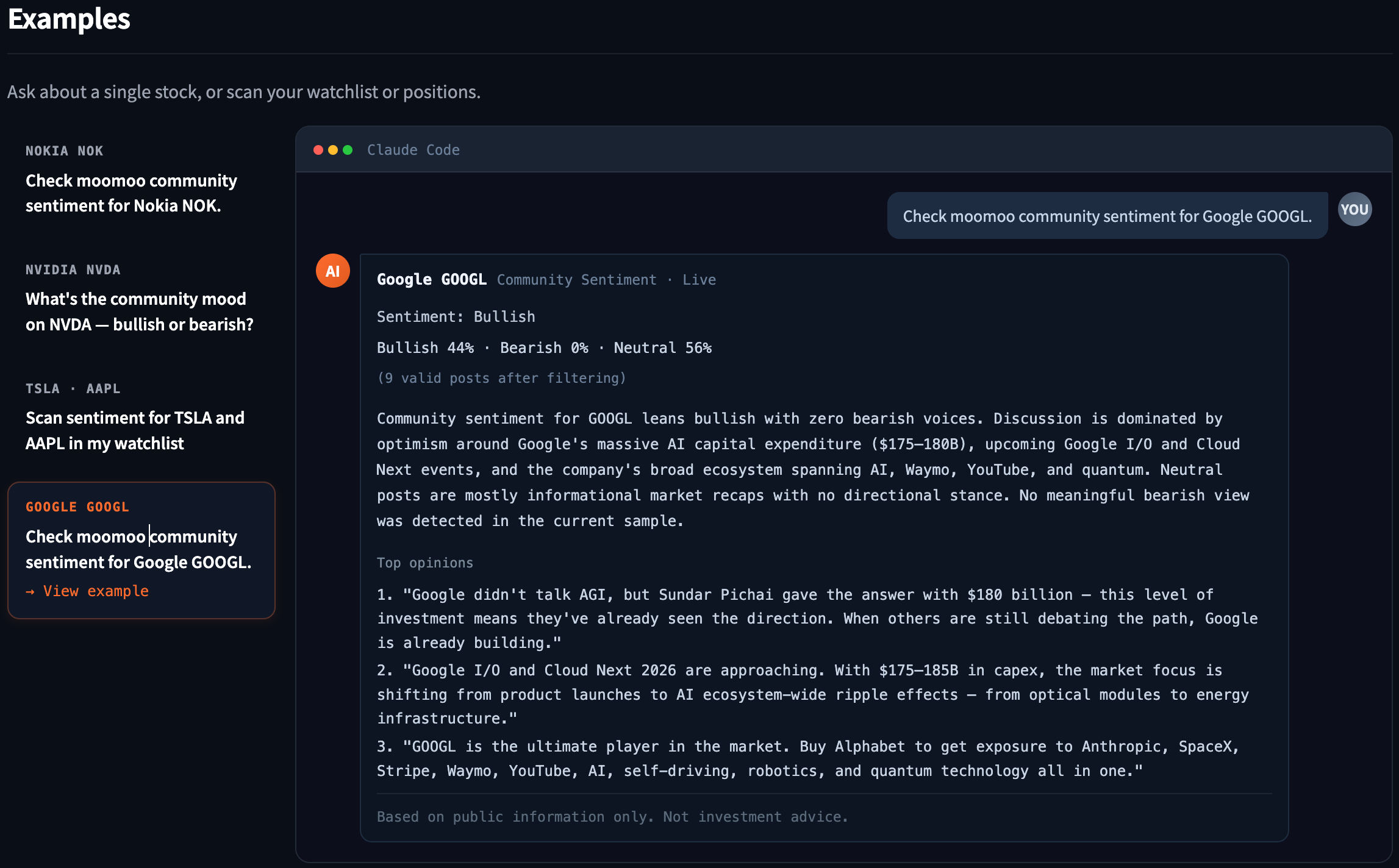
Short-term market moves are often emotion-driven. Sentiment Gauge Skill automatically scans community discussions on moomoo, analyzing bullish/bearish sentiment and discussion heat to help you spot sentiment turning points.
"Is the community more bullish or bearish on AAPL right now?"
"Has the discussion heat on Tesla changed recently?"
Particularly valuable for catching sentiment shifts and timing short-term trades.
3. Multi-Dimensional Signal Analysis
Signal Skills are coming soon. Once live, combined with existing market data, news, and sentiment analysis capabilities, you'll be able to run a full news + technicals + capital flow + derivatives analysis in a single conversation.
Beyond fundamentals and news, experienced investors also watch technical indicators, capital flows, and derivatives markets. Moomoo is developing a new set of signal Skills covering all three dimensions.
Technical Signals — Coming Soon (moomoo-technical-signal skill)
Intelligently scans candlestick patterns and pairs them with MACD, KDJ, RSI, and other mainstream technical indicators to catch overbought/oversold conditions, divergences, and pattern breakouts in real time. No need to stare at charts one by one — AI scans for you and flags anomalies.
Capital Flow Signals — Coming Soon (moomoo-capital-signal skill)
Tracks capital distribution, flow direction, and short-selling activity to quickly reveal where market money is focused. What is smart money buying and selling? Is the short ratio abnormal? This data often reflects market intent before price does.
Derivatives Signals — Coming Soon (moomoo-derivative-signal skill)
Aggregates unusual options activity, position changes, volatility signals, and more. Derivatives market participants tend to be more sophisticated — these signals are often seen as a "smart money" compass.
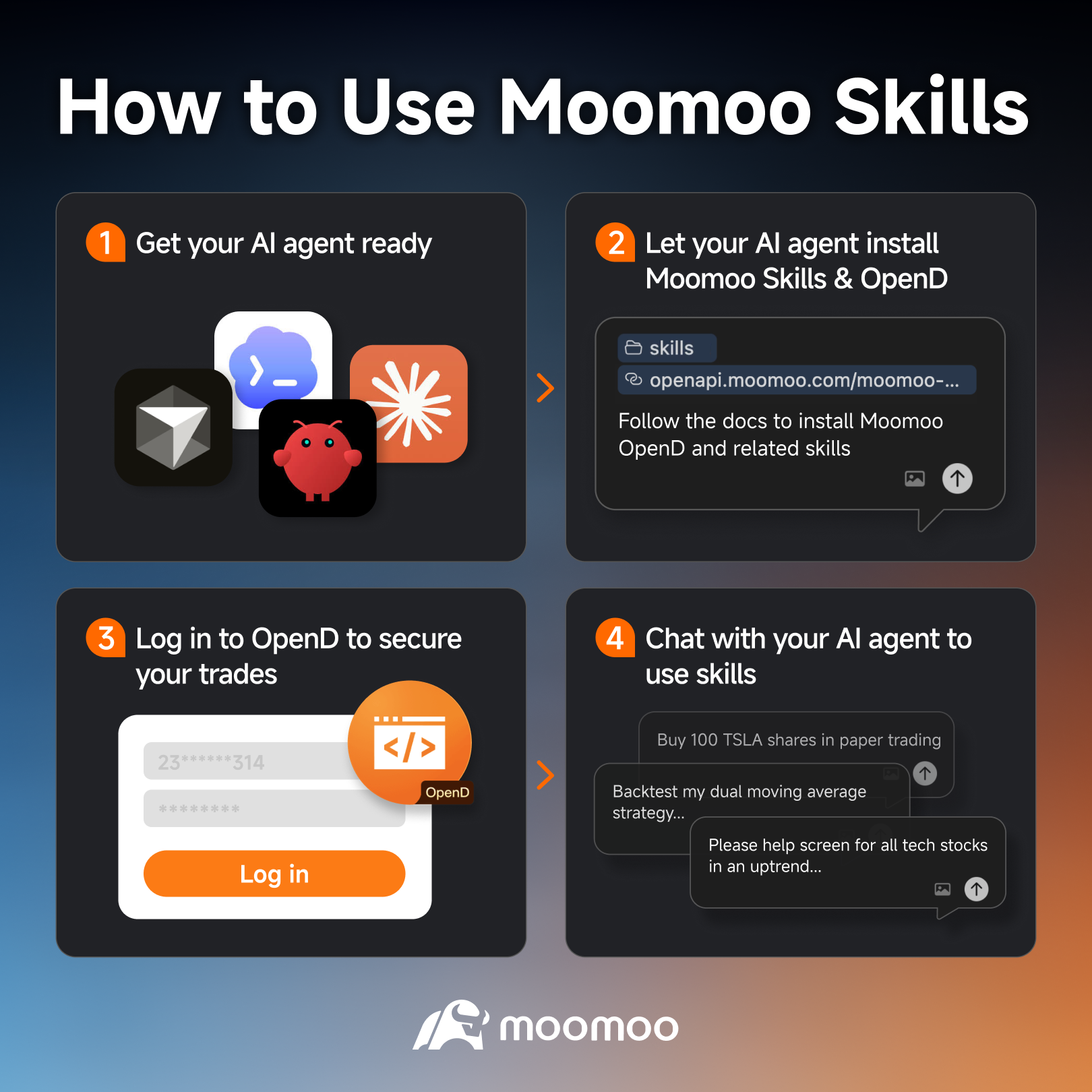
How to Get Started
Just a few steps to begin:
Get your AI tool ready — any tool works: OpenClaw, Claude Code, Cursor, Codex, or others
Install Skills — just send your AI tool a single instruction and it handles the installation automatically: "Follow the guide to install Moomoo Skills: https://www.moomoo.com/skills/moomoo-install.md"
Open the OpenD terminal — this is moomoo's local market and trading gateway; Skills use it to connect to market data and the trading system
Start chatting — ask your AI any investment question in natural language and it will automatically call the right Skill
No coding experience needed, no API documentation to study. If you can use the moomoo App to check quotes and place orders, you can use Moomoo Skills.
Combine and Automate: Build Your Own Investment Workflow
One skill solves one problem. The real power comes from freely combining Skills and automating them.
Trigger Multi-Dimensional Analysis with One Sentence
Say you want a deep dive on Apple:
"Give me a full analysis of Apple's current situation."
Your AI Agent automatically chains multiple skills together and returns a comprehensive report:
Stock Digest — key recent events and directional analysis
News Search — additional news and announcement details
Sentiment Gauge — retail discussion heat and bullish/bearish consensus
Technical + Capital Signals (coming soon) — any pattern breakouts, capital flowing in or out
Then go straight to trading:
"Looks good — buy 50 shares of Apple at a limit of $190."
From information gathering, multi-dimensional analysis, to trade execution — all in one conversation.
Automated Runs
This is one of the biggest differences between Moomoo Skills and platform built-in AI. Because skills run on your own terminal, you can:
Schedule automatic runs: Set your Agent to automatically check your portfolio and scan news every morning before the open — results delivered to you
Condition-based triggers: Write your own logic — e.g., automatically alert you when a stock's community sentiment flips from bullish to bearish
Batch processing: Run Stock Digest across your entire watchlist at once and generate a daily investment brief
No need to manually open the App, search one by one, click one by one. Let your AI Agent handle the repetitive work — you focus on results and decisions.
Security
Letting AI access a real trading account means security comes first. Moomoo Skills are built with multiple layers of protection:
Runs locally: Market data and trades execute through the OpenD local gateway — core data never passes through third-party servers
Every trade requires confirmation: Every trade instruction from AI requires your explicit approval before executing — no automatic orders without your sign-off
Granular permissions: You can enable only market data skills without opening up trading access — read and write permissions are fully separated
Broker-grade risk controls: Backed by moomoo's licensed broker risk management system — the same protection you get when trading in the moomoo App
Simply put: AI can do the work, but you always make the final call.
FAQs
Will AI place trades without my permission?
No. Every trade instruction requires your explicit confirmation before it executes. AI prepares the order — you press the final "confirm."
Is the data real-time?
Yes. Market data comes directly from moomoo's trading system — identical to what you see in the moomoo app.
Which markets are supported?
Market data and trading currently support the United States, Hong Kong, China A-shares, Singapore, and Japan.
Do I need a moomoo account?
The API Skill and multi-dimensional signal Skills require a moomoo account. To use trading features, you'll also need to open an account for the relevant market.
Do I need to know how to code?
Not at all. Moomoo Skills interact through natural language via your AI Agent — just describe what you need, the same way you'd have a normal conversation.
Are Moomoo Skills free?
Skills themselves are free to use. Market data and trading service fees depend on your moomoo account tier and subscription, consistent with normal moomoo service usage.
Investments in capital market products involve risk. Full disclaimers at www.moomoo.com/sg/support/topic5_510. This advertisement has not been reviewed by the Monetary Authority of Singapore.
This presentation is for informational and educational use only and is not a recommendation or endorsement of any particular investment or investment strategy. Investment information provided in this content is general in nature, strictly for illustrative purposes, and may not be appropriate for all investors. Read more