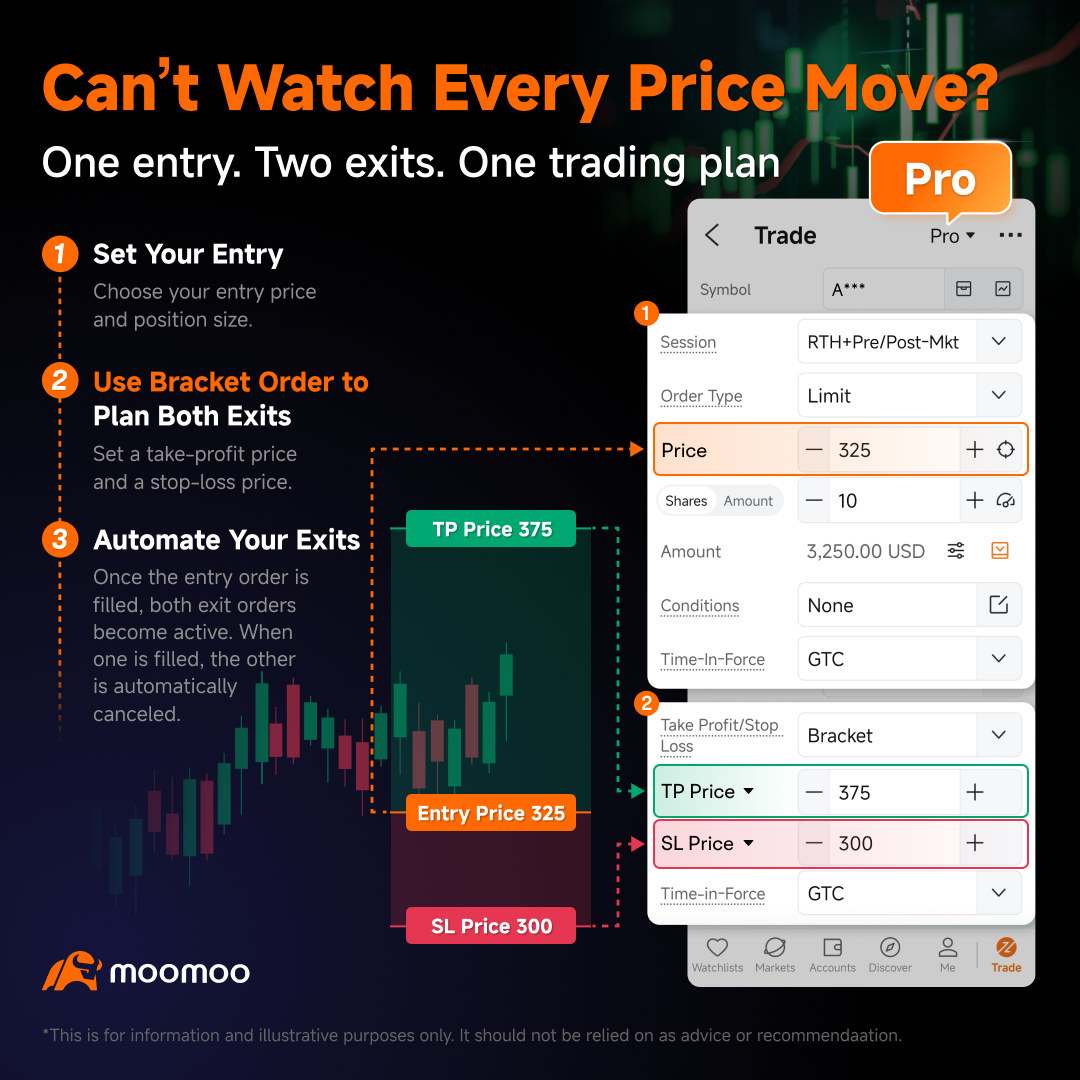

Markets move nonstop—use bracket orders to preplan two exit strategies in advance.
Comment your Bracket Order Plan to win 100 moomoo points 🎉
📊 Poll: What worries you more after opening a position?
A. Exiting too early and missing further upside
B. Waiting too long and giving back gains or increasing losses
Hi Mooer
Every time before you tap “Buy”, you may already be wondering:
Suppose you plan to buy Stock A at $325.“Should I take profit if it reaches $375?” “Can I still cut the loss if it falls to $300?” “If I decide later, will emotions take over again?”
Making decisions in real time can be harder than expected when the market is moving quickly.
Instead of waiting for the price to move before deciding, you can plan both exit scenarios when placing your opening order.
What Is a Bracket Order?
A Bracket Order consists of:
✅ One entry order
✅ One take-profit order
✅ One stop-loss order
After the entry order is filled, the two opposite-side exit orders become active according to the applicable order rules. If one exit order is filled, the other will be cancelled by the system.
An easy way to remember it: One entry, two exits. When one fills, the other is cancelled.
A Bracket Order does not predict the market or guarantee a profit. It is designed to help you plan your exit conditions before entering a position, reducing the need to make an unplanned decision during fast price movements.
Now, let’s walk through a scenario to see how to set up a bracket order.
Example: Planning to Buy Stock A at $325
Suppose you enter:
- Entry price: $325
- Order quantity: 10 shares
- Take-profit price: $375
- Stop trigger price: $300
Before considering fees, taxes, foreign exchange movements, slippage or differences in actual execution:
- Nominal take-profit distance: $500
- Nominal risk distance from the entry price to the stop trigger: $250
- Nominal reward-to-risk ratio: 2:1
This is only an illustration based on preset prices. It does not represent an expected return or a guaranteed maximum loss. After the stop is triggered, the actual execution price may be below $300, so the actual loss could be greater. A 2:1 ratio only compares price distances—it does not indicate a higher probability of success.

What Happens Next?
✅ Scenario 1: The Entry Order Does Not Fill
If the entry order at $325 is not filled, the two exit orders will not become active. They will expire or be cancelled together with the entry order.
✅ Scenario 2: The Entry Order Fills and the Price Rises
After the entry order is filled, the take-profit and stop-loss orders become active according to the applicable rules. If the take-profit order is filled at $375, the stop-loss order will be cancelled.
✅ Scenario 3: The Entry Order Fills and the Price Falls
If the price reaches the $300 stop trigger, the system will submit the applicable order based on the stop order type selected. If that exit order is filled, the take-profit order will be cancelled.
✅ Scenario 4: Neither Exit Is Reached
Both exit orders will remain open according to their respective time-in-force settings. You should continue checking the order status and decide whether any modification or cancellation is appropriate for your plan.
How to Set a Bracket Order on moomoo
Screens and features may vary depending on the region, market, account and app version. Please refer to the actual trading page available to you.
1️⃣ Step 1: Set Up the Entry Order
- Open the stock page and tap “Trade.” Use Pro Mode to place the order, then select the applicable entry order type, trading session, and time-in-force.
2️⃣ Step 2: Enter the Price and Quantity
3️⃣ Step 3: Select “Bracket Order” Under the “Take-Profit/Stop-Loss” Setting
4️⃣ Step 4: Set the Take-Profit and Stop-Loss Exit Levels and Select the Time-in-Force
5️⃣ Step 5: Review and Submit the Order
- Make Sure the Price Direction Is Correct
- For a long position:
- The take-profit price is generally above the entry price
- The stop trigger price is generally below the entry price
- For a short position, where supported by the relevant market and account:
- The take-profit price is generally below the entry price
- The stop trigger price is generally above the entry price
Always review the order direction and quantity before submitting.
⚠️ Three Risks to Remember
1️⃣ A Trigger Price Is Not a Guaranteed Execution Price
A stop price is generally a trigger condition, not a promised execution price. During a market gap, fast market or period of limited liquidity, the actual execution price may be materially different.
2️⃣A Limit Order May Not Fill
Even if the market reaches your take-profit limit, the order may not fill because of rapid price changes, order priority or insufficient liquidity. If a stop-limit order is used, it may not execute at all if the market moves beyond the limit price after triggering.
3️⃣ Taking Profit Also Limits Further Upside
Once the take-profit order is filled, the position has been exited. If the price continues rising, you will no longer participate in that move. A take-profit price is not a guarantee of the “best” exit price.
🎉 YOUR TURN|Share Your Bracket Order Plan
We would rather see your plan and reasoning than a profit-and-loss screenshot.
In the comments, share:
- A real or hypothetical entry price
- Your take-profit price and stop trigger price
- Why you select those levels
- One risk that could still affect the plan
- A screenshot of a Bracket Order setup page (you do not need to submit a live order or complete any trade)- Please conceal your name, account number, balance, positions and other personal information before posting a screenshot.
Valid Comment Requirements
- At least 30 words
- Original and relevant to the Bracket Order topic
- Includes an eligible screenshot
- Plagiarized, duplicate, irrelevant or mass-generated submissions are not eligible
- A maximum of one reward per user
Subject to review, the first 1,000 users who submit a valid comment may receive 100 points.
- Event period: 2026/9/15 - 2026/10/15 (Points will be awarded within 14 business days after the event ends.)
- No purchase, deposit or live trade is required
- Rewards are not based on trade size, trading frequency or investment outcome
- Regional and account eligibility, point usage, expiry and final determinations are subject to the official event rules
Disclosure
This presentation is for informational and educational use only and is not a recommendation or endorsement of any particular investment or investment strategy. Investment information provided in this content is general in nature, strictly for illustrative purposes, and may not be appropriate for all investors. Past investment performance does not indicate or guarantee future success. Returns will vary, and all investments carry risks, including loss of principal.
All examples are hypothetical and do not account for commissions, platform fees, taxes, foreign exchange movements, slippage, liquidity or other transaction costs. The information does not consider any individual’s investment objectives, financial circumstances or specific needs.
Bracket Order availability and functionality may vary by region, licensed entity, market, security type, trading session, account permissions and app version. Parent and child orders may also be subject to different triggering, execution and time-in-force rules. Read the relevant order instructions and risk disclosures before submitting, and continue to monitor your order status.
Stop orders, stop-limit orders and limit orders do not guarantee triggering or execution, nor do they guarantee execution at the specified price. All investments involve risk, including the possible loss of principal. Past performance does not guarantee future results. Consider consulting an appropriately qualified licensed professional where necessary.
All content such as comments and links posted or shared by users of the community are the opinion of the respective authors only and do not reflect the opinions, views, or positions of moomoo or any of its affiliates. Please consult with a qualified financial professional for your personal financial planning and tax situations.
Moomoo is a financial information and trading app offered by Moomoo Technologies Inc.
In Australia, financial products and services available through the moomoo app are provided by Moomoo Securities Australia Ltd, an Australian Financial Services Licensee (AFSL No. 224663) regulated by the Australian Securities and Investment Commission (ASIC). Please read and understand our Financial Services Guide, Terms and Conditions, Privacy Policy and other disclosure documents which are available on our website https://www.moomoo.com/au.In Singapore, investment products and services available through the moomoo app are offered through Moomoo Financial Singapore Pte. Ltd. regulated by the Monetary Authority of Singapore (MAS).
Disclaimer: Moomoo Technologies Inc. is providing this content for information and educational use only.Read more


Comments (7860)
to post a comment
2739
323